Advanced: performance and sound design
This chapter is for when the basics are in your hands. You know the pages, you can start and stop, and you have played a few jams. Now you will learn to perform: to time your moves, shape the sound on purpose, and plan a whole set of bars.
If a button name is new to you, see 01-getting-started. The full lists of ranges and defaults are in 06-reference. Short “how do I…” answers are in 04-how-to. TECHNO basics are in 02-first-jam-techno. CHORD basics are in 03-chord-mode.
Button names. Miyoo names come first. The PC and web keys are in brackets. For example: “R2 (PC: 2)”. The most useful ones here:
| Miyoo | PC / web key |
|---|---|
| L2 (the shift button) | Shift or 1 |
| R2 | 2 |
| L1 / R1 | Q / W |
| A / B / X / Y | Z / X / S / A |
| SELECT / START | Backspace / Enter |
In what follows, “L2+B” means: hold L2, then press B. On a PC that is Shift+X.
Contents
- Think in bars and phrases
- Combos and the shift layer
- Energy ladders, genre by genre
- The send effects: echo, reverb and haze
- Stutter and freeze in depth
- ROLL, UNDO and the history of 8
- Feel, swing and human in depth
- Programming the acid line
- Chords: voice leading, inversions and borrowed colours
- Looping and layering in CHORD mode
- The CPU budget
- Playing with other gear
- PC and web specifics
- Three performance recipes
1. Think in bars and phrases: what lands when
GrainOS has a clock. Almost nothing you do changes the sound at that instant. Most moves are held back until the next bar line (or the next beat, or the next 8-bar phrase line). This is on purpose: it keeps you in time. The skill is knowing when to press.
Some words first:
- A beat is one count (1, 2, 3, 4).
- A bar is 4 beats. The groove has 16 steps in a bar.
- A phrase is 8 bars.
- A grid line is a tick of the clock that the stutter locks to (1/8, 1/16 or 1/32 of a bar’s beat, see section 5).
Here is when each move happens. Learn this table. It is the heart of performing.
| Move | Buttons | Lands |
|---|---|---|
| Play | START (PC: Enter) | At once, from step 1 |
| Stop | START | At the bar line (badge “STOP NEXT BAR”) |
| ENERGY up or down | UP/DOWN on PLAY | Next bar |
| Mute a part (kick, hats…) | A, B, X, Y on PARTS; A on most pages mutes the kick | Next bar |
| Chord pick (CHORDS page) | d-pad and face buttons | Next beat, or next bar (your choice: CHANGE ON) |
| PROG start or change | CHORDS page, L2+UP/DOWN | Next bar |
| Chord style | SELECT | Next bar |
| Key, set | SONG page | Next bar |
| ROLL, UNDO | L2+Y, L2+START | Next bar line |
| FEEL, FILLS | GROOVE page | Next bar |
| Genre switch | L2+L1 / L2+R1 | The next 8-bar phrase line (at once if stopped) |
| Fill now | L2+A | Now (or next bar if fewer than 4 steps are left) |
| Echo throw | B (hold) | At once |
| Freeze haze | L2+B | At once |
| Stutter | R2 (hold) | Starts and ends on a grid line |
| Build | L2+X (hold) | Starts at once. The drop comes on the next bar line after you let go |
What the screen tells you. Badges show what is waiting: “4 > 5 NEXT BAR”, ”> DEEP HOUSE IN 5” (5 more bars), “STOP NEXT BAR”, “DROP NEXT BAR”. On the step strip, an outlined mark is a hit that the next bar line will add. A dimmed mark with a white line is a hit the next bar line will remove. Watch the strip: it shows you the future.
Phrase pips. The header has 8 small lights (“n/8”). The 8th bar is where the big fill falls (with FILLS on FEW or LOTS). A genre switch you ask for in bar 3 waits until bar 8 ends. If you want it at the next line, press it in the middle of the bar before. If you ask too late, it just waits for the line after: nothing breaks.
Tip. To land a drop exactly on a phrase line, release L2+X inside the last bar of the phrase. “DROP NEXT BAR” then falls on bar 1 of the next phrase.
2. Combos and the shift layer
L2 is the shift button. Hold it and the second layer of every control wakes up. The rows 3 and 4 of a page glow when L2 is held:
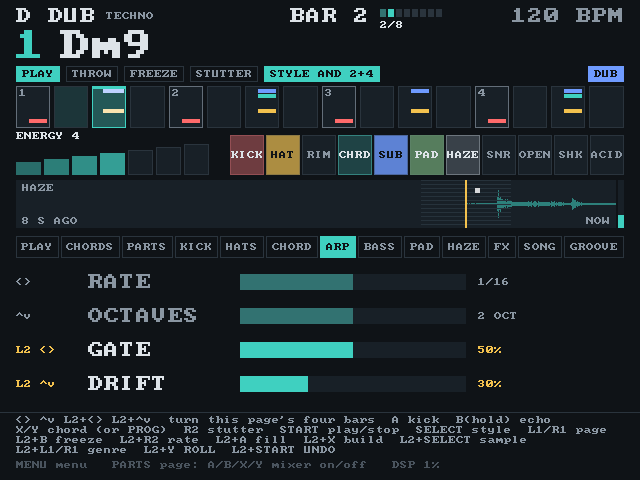
The ARP page with L2 held. GATE and DRIFT are lit. Every bar page works like this.
The four rows
Every bar page has four controls:
| Direction | Row |
|---|---|
| LEFT/RIGHT | row 1 |
| UP/DOWN | row 2 |
| L2+LEFT/RIGHT | row 3 |
| L2+UP/DOWN | row 4 |
Hold to sweep, tap to step
- A stepped control (GENRE, KEY, SET, TEMPO, ENERGY, STYLE) moves one step per press. If you hold it, it starts repeating after 0.35 s.
- A continuous control (levels, filters, times) ramps while you hold. It starts at 25 % of the whole range per second. The longer you hold, the faster it goes.
- The DJ FILTER sweep stops at the centre (OFF). Press again to go on to the other side. This gives you a clean “stop” in the middle of a sweep.
- The control a held direction edits is fixed the moment you press it. If you change page mid-hold, it keeps moving the old control until you let go.
Combos worth learning
These are the moves that work on almost every TECHNO page:
| Combo | What it is for |
|---|---|
| R2 (hold) | Stutter. Repeats a slice of the whole mix |
| L2+R2 | Change the stutter rate: 1/8, 1/16, 1/32 |
| B (hold) | Echo throw: the chords go into the echo at full level |
| L2+B | Freeze the haze (press again to unfreeze) |
| L2+A | Fill now |
| L2+X (hold) | Build. Let go for the drop |
| L2+Y | ROLL (a new variation) |
| L2+START | UNDO the last ROLL |
| L2+L1 / L2+R1 | Previous / next genre |
| L2+SELECT | Next sound source for the haze (LIVE, then each WAV) |
| L2+LEFT/RIGHT on PLAY | DJ FILTER |
| L2+UP/DOWN on PLAY | REV ALL (master reverb) |
Two hands. The Miyoo is held with both thumbs. Your left thumb has the d-pad and your right has A, B, X, Y. The shoulder buttons are under your index fingers. A good habit is: left index on L2, right index on R2. Then L2 plus a face button is one hand-and-thumb move. R2 for a stutter can be held with the right index while the thumbs keep playing.
Two special pages
- CHORDS. The d-pad and face buttons pick chords here, not kick, throw or X/Y. With L2 held, the face buttons go back to the L2 moves (fill, freeze, build, roll). So you can pick chords and still build.
- PARTS. UP/DOWN pick a part. LEFT/RIGHT is that part’s echo send. L2+LEFT/RIGHT is its reverb send. A, B, X, Y switch kick, hats, chords and sub on and off (B does not throw here). You will use this page as a mixer.
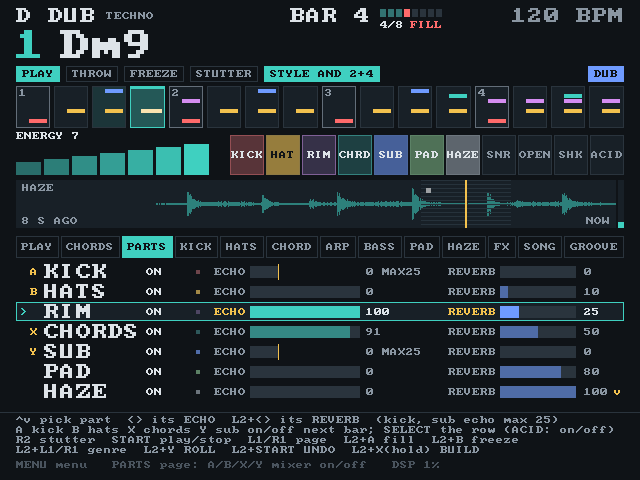
The PARTS page. Each row is a part with echo and reverb send bars. The letters A, B, X, Y sit next to the four parts they mute.
3. Energy ladders, genre by genre
ENERGY (0 to 7) is the “how busy” dial. Each genre has its own ladder: which parts join at each step. Every step also keeps the lower ones.
| ENERGY | DUB | DEEP HOUSE | LO-FI | ACID |
|---|---|---|---|---|
| 0 | pad and haze | (pad and haze) | (pad and haze) | (pad and haze) |
| 1 | kick | kick | kick | kick |
| 2 | hats (offbeat 8ths) | clap and open hat | snare and lazy hats | acid line and open hats |
| 3 | chords | closed hats and chords | chords | clap |
| 4 | sub | sub | sub (held) and a ghost kick | chords |
| 5 | rim on beat 4 | shaker (8ths) | ghost snare and rim | closed hats |
| 6 | busier hats (more 16ths, odd ones soft) | hats around the kick, ghost clap, rim, shaker 16ths | fuller hats | busier hats, ghost clap, rim |
| 7 | rim on beat 2 too. Haze 1.5 times louder | ghost clap pair and a pick-up open hat | busiest, 16th hat ghosts | hat pick-up and more rim |
(Level 0 is only the pad and haze in every genre. The notes list it only for DUB.)
How to use the ladder
- ENERGY is your main fader. Going up one step adds one idea. Going down takes one away. Move it on the bar line, as you would a mixer fader on the beat.
- Know where the lows come in. In DUB the sub arrives at 4. In DEEP HOUSE it also arrives at 4. In LO-FI it is held at 4. In ACID there is no sub: the acid line takes the low end from level 2.
- Know where your top end comes in. In DUB the hats are already at 2. In ACID the closed hats wait until 5.
- Use the gap between steps. From ENERGY 3 to 4 in DUB adds only the sub. That is a very quiet move. From 6 to 7 in DUB makes the rim louder and the haze 1.5 times louder. That is a bigger lift than it looks.
- Mutes win over ENERGY. You can run ENERGY 6 and mute the hats. A muted part shows MUTED in the mixer. A part that is off only because ENERGY is too low shows LOW.
- A genre switch keeps ENERGY. So set ENERGY first, then switch genre. The new genre plays its own ladder at that number.
- The kick is always on the grid. HUMAN does not move it (except a little in LO-FI, see section 7).
The BUILD and the ladder
A build is not a ladder move. It temporarily adds hats and rim from the bar you are in, up to 8 bars. When you let go, ENERGY goes up by one (maximum 7) on the drop. So start a build one step below where you want to land.
The build in numbers (what the code does while L2+X is held):
| Bar of the build | What is added |
|---|---|
| 2 | 8th hats |
| 3 | 16th hats |
| 4 | rim on the off-beats |
| 6 | rim on 8ths |
| the last bar (the bar you let go in, or bar 8) | hat ratchets (fast hat repeats) and no kick |
The echo repeats lift during a build as well. A tap shorter than one bar does nothing. START (stop) cancels it.
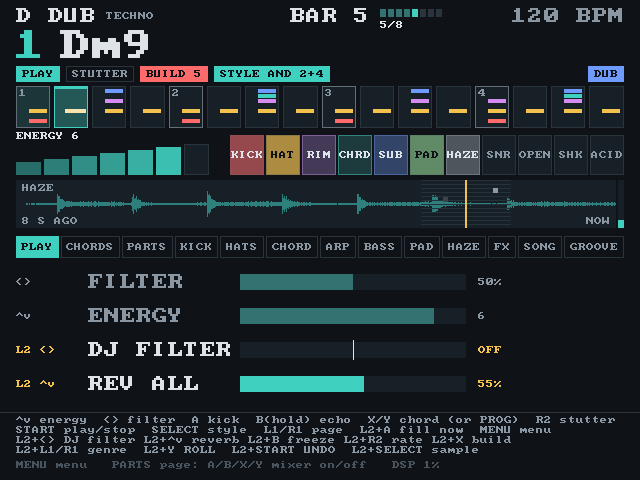
The PLAY page during a build: the red “BUILD n” badge counts bars.
4. The send effects: echo, reverb and haze
Every part has two knobs on the PARTS page: an echo send and a reverb send. A send is “how much of this part goes into the effect”. The effect itself is shared. The haze is a third effect with its own input.
The map
Here is the path of the sound, from the engine’s own notes:
- The parts (kick, hats, chords, pad…) are mixed.
- The chords and the pad (not the drums) are also recorded into the haze buffer, which holds the last 8 seconds.
- The haze plays grains of that buffer back. They join the mix.
- The stutter works on the whole mix (drums, chords, pad and haze).
- The echo and reverb returns are added after the stutter.
- The hiss is added, then the DJ filter, then a soft limiter.
What this means for you:
- The stutter does not cut the echo tail. The mix repeats, but the echoes and reverb that are already ringing keep going behind it. This is why a stutter into an echo throw sounds like it opens up.
- The haze never contains drums. It is made from chords and pad only. So the haze is a cloud of harmony. Muting the chords (X on PARTS) starves the haze over the next seconds.
- FREEZE stops the recording, not the playing. The haze then reuses the last 8 seconds.
Master knobs and part sends
| Knob | Where | What it does |
|---|---|---|
| ECHO ALL | FX page, L2+LEFT/RIGHT | Master echo amount. Scales every part’s echo send |
| REV ALL | PLAY page, L2+UP/DOWN | Master reverb. Scales every part’s reverb send |
| Part echo send | PARTS, LEFT/RIGHT | One part’s share of the echo |
| Part reverb send | PARTS, L2+LEFT/RIGHT | One part’s share of the reverb |
| ECHO TIME | FX, LEFT/RIGHT | 1/8, dotted 1/8, 1/4 |
| FEEDBACK | FX, UP/DOWN | How many repeats |
| DUCK | FX, L2+UP/DOWN | How far the kick pushes chords and pad down |
Two levels of control. A part’s send times the master is what you hear. If you want less reverb in the whole mix, turn REV ALL down. If you want less reverb on only the pad, change the pad’s send in PARTS.
How the three interact
- Echo into reverb. The default routing sends the echoes into the reverb. A long echo with high feedback becomes a wash. If the mix gets cloudy, lower FEEDBACK first (FX page, UP/DOWN) before you touch REV ALL.
- Haze into reverb. The haze’s reverb send is 100 % in DUB. The haze is meant to sit in the room.
- The throw. Holding B sends the stab and rim echo to full level and lifts the repeat level to 85 %. When you let go, the send falls fast, but the repeat level falls over a second or more. So the echoes ring on. This is your best “dub” move.
- Kick and sub echo are capped at 25 %. The PARTS page shows “MAX25”. Their reverb send is high-passed, so low notes do not turn to mud.
- DUCK and the echo. The kick ducks the chords and pad, which are the sources for the haze and the echo. A higher DUCK means a stronger pump. If the pump sounds too strong, lower DUCK (default 55 % in DUB, 70 % in DEEP HOUSE).
- The triplet arp rewrites the echo time. When the ARP page RATE is 1/8 TRIPLET, the echo time shows “1/4T (AUTO)” and follows it. Change the arp rate back and the echo time returns to your setting.
- A genre switch rewrites every send. Every part’s echo and reverb send takes the new genre’s value. If you tuned sends by hand, expect to tune them again after a switch. (ENERGY, key, mutes, DJ FILTER, REV ALL and ECHO ALL are kept.)
Haze character
The haze has four characters (HAZE page, LEFT/RIGHT):
| Character | Note |
|---|---|
| MIST | The default in DUB and ACID |
| SHIMMER | DEEP HOUSE’s default |
| DEEP | LO-FI’s default |
| SHARDS | Your own choice |
SIZE (L2+LEFT/RIGHT) is the grain size, 10 to 1000 ms. Small is grainy. Large is smooth. HISS (L2+UP/DOWN) is the tape and vinyl noise bed.
Try each character on a held chord and choose by ear.
Samples as the haze source
If you put WAV files in the samples/ folder of the card, L2+SELECT (PC: Shift+Backspace) cycles the haze source: LIVE, sample 1, sample 2 … back to LIVE. The haze then grains the file instead of your chords. The strip shows “SAMPLE n/N: name”. The limits are 16 files and 60 s each. The web build loads no WAVs.
5. Stutter and freeze in depth
Stutter
Hold R2 (PC: 2). A slice of the whole mix repeats. It has three steps that follow the clock:
- You press. The stutter is armed.
- On the next grid line, it starts. The slice is the grid step that has just ended.
- You let go. It stops on the next grid line.
Each repeat is on for the first half of the slice, then off for the second half. The edges are about 2 ms, so there are no clicks.
If you press very soon after a grid line (within about 50 ms), the stutter starts on that line, not the next one. This helps when you are a little late.
The rate. L2+R2 steps through 1/8, 1/16 and 1/32. It starts on 1/16. L2+R2 is not a stutter itself, so you can change the rate first, then hold R2.
The rates are named 1/8, 1/16 and 1/32. A bigger number means a shorter slice and a faster stutter. The stutter is locked to the tempo at that rate.
Technique.
- Short and tight. Tap R2 on a beat and let go quickly: you get a short burst, and it stops on the next grid line.
- Into a drop. Set 1/32 (L2+R2) before the last beat of the phrase. Hold R2 through that beat and let go. Then the drop lands on the bar line.
- Stutter plus throw. Hold R2 and B together (B is a throw outside CHORDS and PARTS). The mix repeats while the echo opens up behind it.
- Stutter keeps the echo. Because the echo return is added after the stutter, a stutter does not cut off the echoes already ringing.
Freeze
L2+B is a latch: press once to freeze, press again to unfreeze. While frozen, the haze keeps granulating the last 8 seconds and stops recording new chords. The strip says “HAZE (FROZEN)” in blue.
Technique.
- Freeze a chord, then change. Wait for a chord you like to fill the haze (let it play for a bar or two). Press L2+B. Now pick a different chord. The old one stays in the haze as a cloud, and the new one plays on top.
- Freeze then drop ENERGY. Freeze, then bring ENERGY to 0 and you have a cloud over silence. When you unfreeze, the haze starts recording again with a short crossfade (no click).
- Freeze with a WAV source. The freeze only stops the recording of chords into the live buffer. With a WAV source, try it first before you rely on it in a show.
6. ROLL, UNDO and the history of 8
ROLL (L2+Y, PC: Shift+A) asks the engine for a new variation inside the same genre. It lands on the next bar line. The header shows “ROLL n”.
What a roll changes
From the code, each roll draws five new things:
| Draw | In plain words |
|---|---|
| a drum variation | a different small pattern (ghost hats, an extra rim, a pick-up kick…) |
| a fill and stab “salt” | the small random flavour of fills and stab placement |
| an acid seed | a new acid line (see section 8) |
| an arp order | a new order for the arp notes |
| a chord style | one of the styles that genre allows |
The number of variations is per genre:
| Genre | Variations | Chord styles a roll may pick |
|---|---|---|
| DUB | 4 | OFFBEAT, 3-3-2, AND 2+4, SPARSE |
| DEEP HOUSE | 6 | OFFBEAT, 3-3-2, AND 2+4, PULSE |
| LO-FI | 7 | BROKEN, HOLD |
| ACID | 6 | AND 2+4, SPARSE, OFF, PULSE |
ROLL 0 is the genre’s own groove. The code avoids picking the variation that is already playing.
The history of 8
Every roll saves the one before it. L2+START (PC: Shift+Enter) goes back one roll, up to 8 rolls deep. The undo returns the exact previous roll: same variation, same acid line, same arp order, same style.
If you roll a ninth time, the oldest roll is dropped from the history. With nothing to undo, the ROLL badge flashes “NO UNDO”.
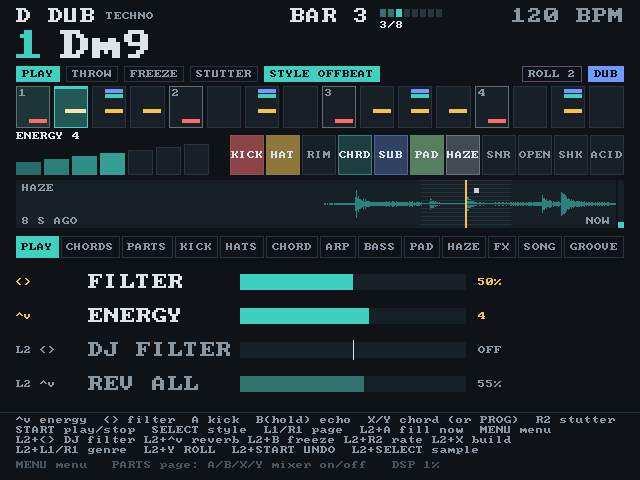
The ROLL badge in the header after two rolls.
Things to remember:
- A genre switch clears the history. After a switch you are back at ROLL 0 of the new genre, with nothing to undo. If you find a roll you love, do not switch genre.
- New jam (menu) keeps the roll history. The menu rows “Roll groove” and “Undo roll” do the same as the buttons and close the menu.
- Rolls are quantised. If you press ROLL twice in the same bar, both are applied in order on the bar line.
- The roll’s random pick is not shown. You cannot choose it. Rolling is a random walk. Your safety net is UNDO.
A rolling routine
- Start with ENERGY 4 or 5 so the variation is audible.
- Press ROLL at the start of a bar (the new bar will take it).
- Listen for 2 bars. If you do not like it, UNDO. If you do, keep it and roll again from there.
- Roll on a phrase line to give a change meaning. Roll in the middle of a bar, and the change comes at the next line anyway.
7. Feel, swing and human in depth
All three live on the GROOVE page (and SWING also on the CHORD-mode BEAT page).
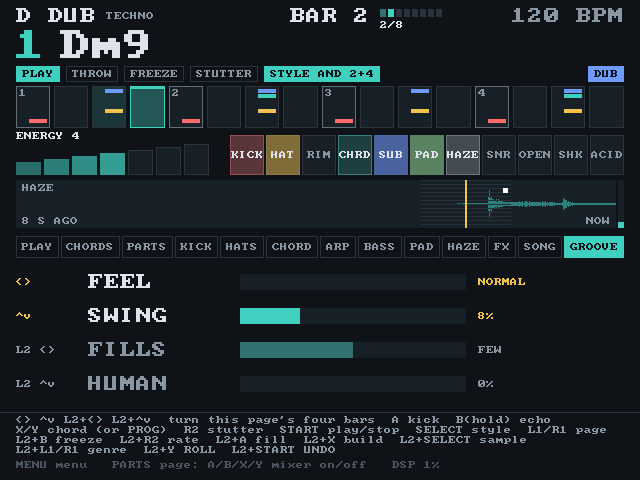
The GROOVE page: FEEL, SWING, FILLS, HUMAN.
FEEL
FEEL (LEFT/RIGHT) lands on the next bar. It has four values:
| FEEL | What it does |
|---|---|
| NORMAL | The genre’s own pattern |
| HALF-TIME | Stretches the kick and snare/clap over twice the time. The backbeat falls at half speed |
| DOUBLE HATS | Doubles the hat density. The new hits are soft |
| SHUFFLE | Forces at least triplet swing (33 %) on the 16ths |
A few tips:
- HALF-TIME makes DEEP HOUSE feel slower without changing the tempo. This is a way to build a “breakdown” feel at full tempo.
- DOUBLE HATS is a fast way to add motion at the top without raising ENERGY.
- SHUFFLE raises the swing to at least 33 % (a triplet feel). SWING only goes up to 30 %, so while SHUFFLE is on, it always uses 33 %.
SWING
SWING (UP/DOWN) delays every odd 16th step. It runs from 0 to 30 %. At 33 % it would be an exact triplet feel. Higher numbers feel looser.
| Genre | Default swing |
|---|---|
| DUB | 8 % |
| DEEP HOUSE | 16 % |
| LO-FI | 25 % |
| ACID | 0 % |
- Swing moves more than the hats. In the code, odd steps of the drum triggers and the stabs are all delayed. The harp style in CHORD mode feels it too (BEAT page).
- A long acid slide follows the swing. The slide to the next note ends on the next note’s real (swung) time.
- A genre switch resets swing to the new genre’s value.
HUMAN
HUMAN (L2+UP/DOWN, steps of 5 %) makes hits fall slightly late. It never makes them early.
Two facts you can use:
- It is the same every bar. The lateness is a fixed function of the genre, the part and the step. It does not use a random number. So you get a consistent push-and-pull, not random noise. That is why it feels like a groove, not like a mistake.
- Each part has its own weight. At HUMAN 100 %, the biggest lateness of each genre is:
| Genre | Max lateness at 100 % | Kick | Notes |
|---|---|---|---|
| DUB | 10 ms | 0 | hats, rim, open hat, shaker are the loosest |
| DEEP HOUSE | 8 ms | 0 | shaker 1.0, hats 0.8 |
| LO-FI | 14 ms | 0.5 | everything loose, even the kick a little. No open hat and no shaker |
| ACID | 4 ms | 0 | only the hats, and only a hair. The acid line is untouched |
So HUMAN at 100 % in DUB is at most 10 ms late on the loosest parts. That is small but you will feel it. Raise it in steps of 5 %.
Combine them. A lazy lo-fi feel is: FEEL HALF-TIME, SWING 25 %, HUMAN 40 %. A tight machine feel is: SWING 0, HUMAN 0, FEEL NORMAL.
FILLS
FILLS (L2+LEFT/RIGHT): OFF, FEW, LOTS.
- FEW gives a small turnaround on every 4th bar and a big fill on the 8th.
- LOTS adds a small one on bars 2 and 6, about half the time.
- Each genre has its own fill style: DUB has kick-outs and hat runs, DEEP HOUSE has clap rolls, LO-FI has small drummer gestures and never a build, ACID has snare-roll builds and hat runs.
- L2+A (fill now) gives a fill for the rest of this bar, on your command.
8. Programming the acid line
The acid line is the squelchy bass of the ACID genre. It replaces the sub. You do not write notes. You steer it with four things:
| What you steer | How |
|---|---|
| The notes | The chord in force, ENERGY, and the ROLL seed |
| The sound | The four rows on the BASS page |
| The placement | The chord style and the groove |
| The amount | ENERGY, and the ACID row in PARTS |
The notes
The 16-step pattern depends only on three things: the roll’s random pick (a number each ROLL draws, called the seed), ENERGY, and the chord. That means:
- Same chord, same ENERGY, same seed: same line. So the pattern is stable and repeats every bar.
- Change the chord, and the line changes. The root of the line is the chord root (placed in the low range). The pattern’s notes are offsets from that root.
- Change ENERGY, and the line changes. So raising ENERGY does not only add parts. It can rewrite the acid pattern too.
- ROLL gives a new seed. It is the way to “write a new line”. UNDO brings back the old one exactly.
A workflow to program a line:
- Switch to ACID with L2+R1 (it lands on the phrase line). Chord set DORIAN and 130 BPM come with it.
- Set ENERGY 2 or more so the line plays.
- Pick the chord you want it to follow (CHORDS page). Hold on that chord with PROG HOLD.
- Press ROLL a few times and listen. When you hear a line you like, stop rolling. Note that UNDO is your bookmark: it goes back, up to 8 rolls.
- Change the chord. The same seed now makes a new line from the new root. Rolling again is optional.
- Try a PROG so the line follows a chord walk.
The sound
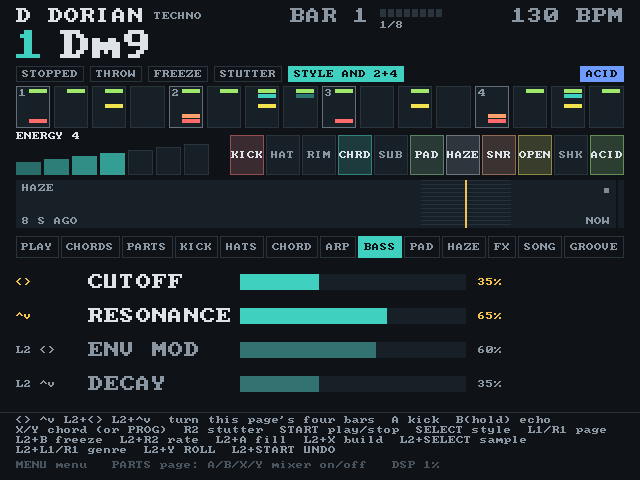
The BASS page in the ACID genre. The rows are CUTOFF, RESONANCE, ENV MOD and DECAY.
| Row | Direction | ACID default | What it does |
|---|---|---|---|
| CUTOFF | LEFT/RIGHT | 35 % | How open the filter is |
| RESONANCE | UP/DOWN | 65 % | The squelch. At the top, the filter whistles by itself |
| ENV MOD | L2+LEFT/RIGHT | 60 % | How far each note sweeps the filter |
| DECAY | L2+UP/DOWN | 35 % | How fast the sweep falls (0.1 to 0.8 s) |
The voice is a bright, buzzy wave through a filter that sweeps. At full resonance the filter whistles by itself, but it cannot run away.
Moves.
- Slow filter ride. Hold LEFT or RIGHT on CUTOFF. It ramps (25 % of the range a second at first, faster the longer you hold).
- Squelch by contrast. Low CUTOFF with high ENV MOD gives notes that open and close. High CUTOFF with low ENV MOD gives a steady buzz.
- Accents and slides are in the pattern. Some notes are louder and brighter with a shorter filter decay (accent). Some slide from the previous note (the pitch glides for about 60 ms and the envelopes are not restarted). You do not control these directly. ROLL changes them.
The row in PARTS
The ACID row on PARTS has the echo and reverb sends (default echo 30 %, reverb 10 %). SELECT on that row switches the line ACID ON and OFF at the next bar. This is useful for a “line drops out” moment.
9. Chords: voice leading, inversions and borrowed colours
The sets
There are 8 chord sets, 8 chords each, always in your key. The same chord numbers mean different chords in each set. In key C:
| Set | Chords 1 to 8 |
|---|---|
| DUB | Cm9, Fm9, Gm7, Abmaj7, Bb6/9, Csus4(9), Ebmaj7, Fm11 |
| DEEP | Cm9, Bbmaj9, Abmaj9, Gm9, Fm9, Ebmaj9, Cm11, Bb6/9 |
| MELANCHOLY | Cm7, Abmaj7, Ebmaj7, Bb, Fm7, Gm7, Abadd9, Cm(add9) |
| DREAMY | Cmaj9, D, Em7, Am9, Fmaj7#11, Gsus4, C6/9, Am11 |
| DORIAN | Cm9, F9, Bbmaj7, Gm7, Ebmaj7, Dm7, F6/9, Cm11 |
| SUS | Csus2, Bbsus4, Abmaj7sus2, Fsus4(9), G5, Ebsus2, C5, Bbsus2 |
| PLANE | Cm9, Ebm9, Fm9, Gm9, Abm9, Bbm9, Cm11, Fm11 |
| LOFI | Cmaj9, Dm9, Em7, Fmaj9, G13, Am9, A9, Fm6 |
The chord set also decides the key spelling. Minor-type sets show C#, Eb, F#, G#, Bb. DREAMY and LOFI show Db, Eb, F#, Ab, Bb.
Voice leading
Voice leading is how each note of one chord moves to the nearest note of the next. Smooth voice leading sounds connected. Jumps sound like separate blocks.
What GrainOS does for you. In CHORD mode, when you change chord while one is held, each sounding note slides (about 5 ms) to the nearest note of the new chord. It does not restart. The engine also checks the four inversions (and octave shifts of one octave) and chooses the voicing with the smoothest move from the chord before. Your INVERSION choice is a preference. The engine keeps it unless another voicing is clearly smoother.
The chords sit in the range of MIDI notes 43 to 88 (MIDI numbers the keys of a piano). With ROOT or OPEN, the lowest note is between 43 and 54.
Inversions
L2+R2 (PC: Shift+2) steps through four inversions on any page of CHORD mode. R2 alone never changes it (R2 alone records a loop).
| Inversion | Meaning |
|---|---|
| ROOT | The root is the lowest note |
| 1ST | The lowest note moves up an octave |
| 2ND | The lowest two notes move up an octave |
| OPEN | Root, fifth, then everything else above the octave (spread out). The default in CHORD mode |
Practical use.
- Common-tone progressions. On a progression such as chords 1 > 4 > 5 > 6 in DREAMY, try 1ST or 2ND. Because the inversion keeps the register near the root position’s centre, the top of the chord stays closer from chord to chord.
- OPEN for pads and slow tunes. It spreads the chord and is good under a held note.
- ROOT for bass and for pulse. The root is at the bottom, which is the clearest for rhythmic styles.
- Change inversion mid-loop. The loop stores the inversion with every chord (see section 10). So you can change it while recording different bars.
Colours are borrowed colours
In CHORD mode, L2 plus the d-pad adds a colour to the chord you hold. Think of colours as borrowed notes: a note that is not in the set’s own chord, taken from a nearby sound.
| Colour | Buttons | What it does |
|---|---|---|
| SWAP | L2+UP | Major to minor and back (the third moves) |
| 7TH | L2+DOWN | Adds the 7th (the set’s own, or a borrowed one) |
| SUS | L2+RIGHT | First press SUS4 (third becomes the 4th). Second press SUS2 (third becomes the 2nd). Third press off |
| ADD9 | L2+LEFT | Adds the 9th |
The code stacks the notes into a wide voicing (3rds, 5ths and 7ths low; 9ths, 11ths and 13ths above the third). A clash check lifts any minor 2nd out of the upper notes, so colours do not rub.
Examples seen on screen (set DREAMY, key C):
- Chord 5 (Fmaj7#11) with SWAP and 7TH shows “Fmaj7#11 -> Fm7”. A major chord turns minor, and the 7th that goes with it comes along.
- Chord 6 (Gsus4) with 7TH shows “G7sus4”.
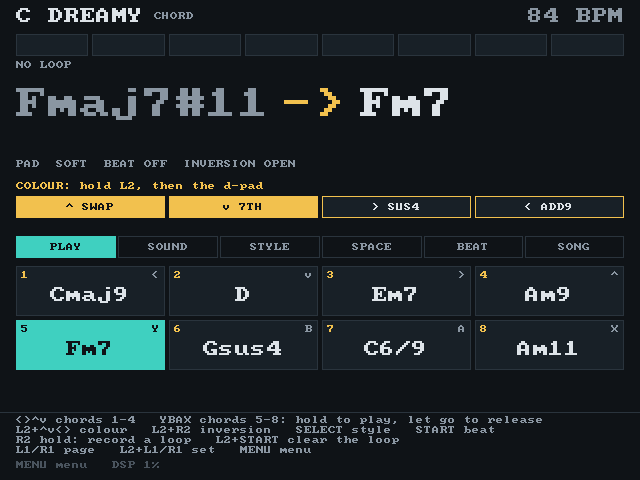
Chord 5 held with SWAP and 7TH. The big name shows plain chord, arrow, coloured chord. The chips for SWAP and 7TH are lit.
The rule of colours. The colour belongs to the chord you are holding. A new chord pressed without L2 starts plain. A chord pressed while L2 is held keeps the colour. To colour a chord:
- Hold a chord, then hold L2 and tap the d-pad. The notes glide to the colour.
- Or hold L2 and the d-pad colour first, then press a face button chord.
Use a face button for the chord when you colour with the d-pad. If the chord is on a d-pad direction (chords 1 to 4), pressing that direction as a colour is ignored by the chord logic. Chords 5 to 8 (Y, B, A, X) are free for it.
Borrowed-colour moves.
- SWAP for a “minor fall”. In DREAMY, chord 5 is major. SWAP turns it minor for one bar. This is the classic sad turn.
- SUS to postpone. SUS4 on a major chord holds the tension. To resolve, press L2+RIGHT until SUS is off (SUS4, SUS2, off), or let go of the chord and press it again without L2.
- ADD9 for glow. A chord with ADD9 sounds fuller. Use it on the last chord of a loop.
- A mixed set. SWAP+7TH+SUS together are allowed (“any mix”). Try them one at a time first.
10. Looping and layering in CHORD mode
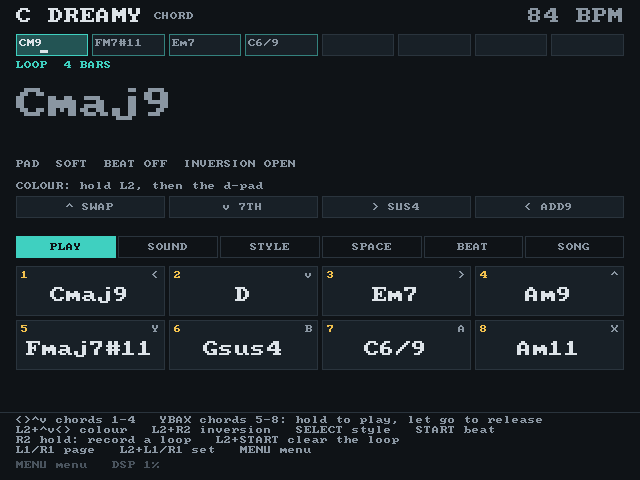
The loop row while a 4-bar loop plays. Each box shows the chord at the start of the bar. The white play head sweeps the bar being played.
(The picture is an example. Your own loop will show your chords.)
The rules, in plain words
- The loop lives on the bar grid of the tempo. Positions snap to the 8th note (8 slots a bar). Up to 8 bars.
- Hold R2 (PC: 2). It waits for the next bar line (“REC: starts on the bar line”), then records (“RECORDING bar n”).
- It records the chord buttons you play, with their colour and inversion. A press lands on the nearest 8th. A tap lasts at least one 8th.
- Let go of R2. The bar you are in finishes, then the loop closes and plays from the start. It also closes by itself at 8 bars.
- If you let go before the bar line, the recording cancels. A recording with no chord is dropped.
- L2+START clears the loop at once. If there is none, the row flashes “NO LOOP TO CLEAR”.
- The loop is not saved when you change mode or switch off. Menu > New jam also clears it.
Overdub
Hold R2 again while the loop plays: “OVERDUB bar x of n”. The replacing starts at the next bar line. Every bar that starts while R2 is held is replaced by what you play (or by a rest if you play nothing). If you let go in the middle of a bar, that bar finishes, then it plays normally.
So overdub is “replace”, not “add”. There is no layering of two chords at once. Think of it as a loop where you can rewrite the bars you choose.
Playing on top
While a loop plays, holding a chord by hand replaces the loop’s chord while you hold it. When you let go, the loop’s chord comes back. Chord cells turn purple when they are the looped chord and nobody is holding them.
Layering strategies
The loop holds chords. The rest of the sound is live. So you “layer” by changing the other settings while the loop runs.
Strategy 1: change the style, not the loop. Record in PAD style. Then press SELECT to go to STRUM, HARP or PULSE. The loop’s chords are the same. The style is a live setting.
Strategy 2: change the voice. Move to the SOUND page. Switch SOFT to GLASS or STRINGS. Raise RELEASE (L2+LEFT/RIGHT) for a longer ring. Change BRIGHTNESS (L2+UP/DOWN) over time.
Strategy 3: add the beat. START turns on the beat. The first time it is BRUSH. Afterwards it resumes your last beat. The loop does not need a beat. The bar line comes from the tempo clock.
Strategy 4: play over it. Hold a chord by hand to replace the loop’s chord for a moment: a variation without touching R2.
Strategy 5: re-harmonise. The loop stores the chord number (1 to 8), the colour and the inversion. It does not store note names. Its boxes are drawn from the current set and key. This means that when you change the SET (L2+L1 / L2+R1, which applies at once) or the KEY (SONG page), the same loop plays in a new harmony. Try a few sets on the same loop and listen.
Strategy 6: bar by bar overdub. Hold R2 across only the bars you want to rewrite. Release R2 inside the last bar you want changed.
A quick loop recipe
- Pick DREAMY, key C, tempo 84 (BEAT page, L2+LEFT/RIGHT).
- Wait for the bar line. Hold R2 as the bar starts.
- Bar 1: hold LEFT (chord 1, Cmaj9) for the whole bar.
- Bar 2: hold UP (chord 4, Am9).
- Bar 3: hold Y (chord 5, Fmaj7#11).
- Bar 4: hold B (chord 6, Gsus4). While you hold it, hold L2 and tap DOWN for 7TH.
- Let go of R2 during bar 4. The loop closes at the end of bar 4 and plays.
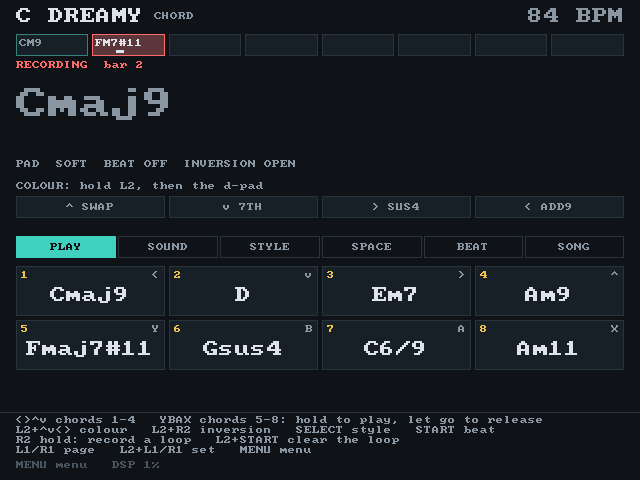
Recording bar 2. The red box is the bar being written.
11. The CPU budget: what is heavy
Your Miyoo has one small processor doing all the sound. If it runs out of time, the audio crackles. GrainOS tells you how busy it is: DSP n% on the grey status line, and on the Device screen (Menu > Device).
- The self-test measures three cases (default, ENERGY 7 with the arp, worst case) and gives a WARN when the engine takes more than 60 % or 80 % of a core in those cases. Read the self-test report on your card (
report-N.txt) for your real numbers.
What costs the most. The haze with the MIST character at full amount is the single heaviest choice in any genre. That is why DEEP HOUSE defaults to SHIMMER.
So, practical advice:
- The haze is the heavy part. A high HAZE AMOUNT with MIST is the most expensive single choice. If your DSP number climbs and the sound crackles, lower the haze amount first.
- The busy end of the ladder costs more. ENERGY 7 plus the arp is one of the self-test’s cases for a reason.
- Lower the load a step at a time. Haze amount first, then ENERGY, then the arp. Watch the DSP number after each change.
- Watch DSP while you play. Keep it under about 60 % of a core. That is where the self-test starts to warn.
- If it crackles, change Latency. Menu > Latency has SAFE (60 ms buffer), NORMAL (25 ms) and LOW (12 ms). SAFE is slowest to respond and safest. The change applies after a restart.
- Safe mode (Menu > Device > Safe mode) is a calm mono setup with a bigger buffer for when nothing else works.
12. Playing with other gear
What works today
- Audio out. GrainOS makes sound. You can plug the headphone output into a mixer, an audio interface or a pedal. The sound is stereo (unless safe mode, which is mono on purpose).
- Hand sync. You can set the tempo by hand. SONG page, L2+UP/DOWN, 40 to 200 BPM. Hold to move fast. START begins at once at step 1, so press it on your other gear’s bar 1.
- Samples in. WAV files on the card feed the haze. This is the only way other sources reach GrainOS today.
- Effects out. Use your other gear’s effects on the headphone signal. Use the FX page of GrainOS sparingly then, so the echoes do not stack.
What does not work today
- No MIDI sync. GrainOS does not send or follow a clock.
- No MIDI notes in or out.
- No direct link to the FM1. The Miyoo’s USB-C port only charges, so the design cannot plug a USB cable into the FM1.
- No Wi-Fi features. The boot turns Wi-Fi off. Nothing uses it yet.
- No saved jams. Everything resets at power on, except volume, latency, brightness, dim and mode. Plan your set in your head or on paper.
The plan (not built)
From the project plan: the FM1 link comes after version 1. The owner wants to play the FM1 first and decide what the link is for. The chosen idea is a Wi-Fi bridge (a small ESP32 box), not a hardware mod. If the FM1 runs SLOOP firmware, the link must work with a TRS clock cable (no Bluetooth). All of this is a plan. None of it is built, and the dates may change.
How to jam alongside the FM1 today
- Set the tempo on both by ear or by tapping.
- Start GrainOS on the bar line of the FM1’s loop.
- Use ENERGY 0 or 1 (pad and haze, then kick) as a bed, and keep the rest of the ladder for your drops.
- Stop with START. It stops at the bar line, so your stop will line up with the bar.
- The clock does not follow anyone, so over a long time the two will drift. Re-start at a phrase line.
13. PC and web specifics
| Miyoo | PC | Web | |
|---|---|---|---|
| Menu rows | all | no Latency, Brightness, Dim, Device, Power off. Has Quit | no Latency, Brightness, Dim, Device, Power off, Quit, Samples |
| Settings saved | yes | yes (in the folder you start from) | no (reload = defaults) |
| WAV samples | yes | yes | no |
| MENU hold | power off | Esc held 1 s quits | does nothing |
| DSP meter | yes | yes | reads 0 |
| Self-test, safe mode | yes | make selftest (about 25 s) | no |
Key differences. The key letters are not the same as the Miyoo letters. The Miyoo A is the key Z. The Miyoo Y is the key A. L2 is Shift or 1. Screens always print the names of the platform they run on, so on a PC the footers say “Shift+Enter” where the Miyoo says “L2+START”.
On the web.
- Click the player so it has focus. Keys work only while it has focus.
- Use headphones. Nothing starts until you click Start.
- iPhones mute web audio when the silent switch is on.
- Anything with a standard-mapping gamepad plays like the Miyoo.
- If you see on-screen buttons, they are the Miyoo buttons.
- Nothing is saved. Do not plan a long set on the web without a plan on paper.
- The web has no DSP meter, so you cannot see the load there.
On the PC. make run plays. grainjam --render out.wav 60 renders to a WAV file without playing. The PC is the easiest way to practise the moves in this chapter, because a keyboard is faster than thumbs. The sound is the same engine.
14. Three performance recipes
Each recipe is a plan of 8 or 16 bars. Bar 1 is the first bar after you start. Read each plan as: do this at the start of the bar (unless it says otherwise). Because most moves land on the next bar line, press them a little before the bar you want.
The recipes use only moves that exist in the code. They tell you what changes on screen. They do not claim to know how it will sound to you. Your ears decide.
Recipe A: Dub (8 bars, loops forever)
Setup. New jam. TECHNO, genre DUB, key D, set DUB, 120 BPM. On the CHORDS page, set CHANGE ON to NEXT BAR (L2+LEFT/RIGHT). On the FX page, check ECHO TIME is DOTTED 1/8.
The idea. Slow, deep, one chord walk, one big drop at the end.
The chords in D, set DUB: 1 Dm9, 2 Gm9, 3 Am7, 4 Bbmaj7, 5 C6/9, 6 Dsus4(9), 7 Fmaj7, 8 Gm11. PROG 1 plays chords 1, 2, 1, 2 (2 bars each).
| Bar | You do | What changes |
|---|---|---|
| (before) | ENERGY 2 (PLAY page, UP/DOWN). Go to CHORDS, set PROG 1 (L2+UP/DOWN) | Kick and hats. PROG 1 starts on the next bar line and repeats every 8 bars |
| 1 | Nothing. Listen | ENERGY 2: kick and hats |
| 2 | ENERGY to 3 (PLAY page) | Chords join, on bar 3 |
| 3 | On the PLAY page, hold B for the last beat of the bar, then let go | Echo throw: the chord stabs flood the echo. The echoes ring on after you let go |
| 4 | ENERGY to 4 | Sub arrives, on bar 5 |
| 5 | L2+B (freeze) at the start of the bar | The haze holds the last 8 seconds. It stops recording |
| 6 | PARTS page: mute the hats (B). On the PARTS page press DOWN to the CHORDS row, then hold RIGHT to raise its echo send | Hats leave on bar 7. More echo on the chords |
| 7 | Hold L2+X (build) from the start of the bar | The build begins. Hats and rim lift |
| 8 | Keep holding. Release L2+X in the middle of the bar | Badge “DROP NEXT BAR”. The build’s last bar (ratchets, no kick) takes the place of the fill |
| 1 (next phrase) | Un-mute the hats (B on PARTS). L2+B to unfreeze | The drop lands. ENERGY goes up by 1 (to 5, with the rim) |
Variations.
- Swap the hats with the filter. Instead of muting the hats in bar 6, sweep the DJ FILTER (L2+LEFT on PLAY) toward low-pass, then sweep back on the drop.
- Hold the build for 2 bars. Start the build in bar 6 and let go in bar 8. A longer build has more stages (see section 3).
- Roll in the second phrase. After the drop, press ROLL (L2+Y). If you do not like it, UNDO.
Why it works. The drop is on the phrase line, the throw sits in the middle of the phrase, and the freeze happens when the density is low. Every move lands on a bar line, so the whole thing stays in time.
Recipe B: Deep house (16 bars, two phrases)
Setup. Start from the default DUB jam at ENERGY 4. Set the key you want first (SONG page, UP/DOWN). The genre switch keeps key and ENERGY.
The chords in D, set DEEP: 1 Dm9, 2 Cmaj9, 3 Bbmaj9, 4 Am9, 5 Gm9, 6 Fmaj9, 7 Dm11, 8 C6/9. PROG 1 plays chords 1, 2, 3, 4 (2 bars each).
The genre values (DEEP HOUSE): 122 BPM, swing 16 %, HUMAN 20 %, style 3-3-2, chord sound ORGAN, pad STRINGS, haze SHIMMER 30 %. These arrive by themselves with the genre.
| Bar | You do | What changes |
|---|---|---|
| (bar 6 or 7 of the old phrase) | Press L2+R1 once | Badge ”> DEEP HOUSE IN n”. The tempo glides over one bar at the switch |
| 1 | The genre lands. Set ENERGY 3 | Kick, clap, open hat, closed hats and chords |
| 2 | Nothing. Listen to PROG 1 start | Chords walk 1 to 4 over 8 bars |
| 3 | ENERGY 4 | The sub arrives |
| 4 | A short stutter: tap R2 (rate 1/16 is the default) on beat 4 | A short burst of the mix repeating |
| 5 | ENERGY 5 | The shaker joins |
| 6 | GROOVE page: FEEL to DOUBLE HATS | More hats, soft |
| 7 | Return FEEL to NORMAL | Hats go back |
| 8 | Hold B on beat 3 and 4 and release | Throw into the fill |
| 9 | ROLL (L2+Y) | New variation inside DEEP HOUSE |
| 10 | ENERGY 6 | Hats move around the kick. Ghost clap, rim and shaker 16ths |
| 11 | FEEL to HALF-TIME at the start of the bar | Kick and clap at half speed |
| 12 | PARTS page: select the HATS row and press SELECT to mute it (or press B) | The hats leave on bar 13 |
| 13 | FEEL back to NORMAL. Un-mute the hats (B on PARTS). ENERGY 7 | Ghost clap pair and a pick-up open hat |
| 14 | Set the rate to 1/8 (press L2+R2 twice from 1/16; the STUTTER badge shows the rate), hold R2 for one beat, then let go | A short repeat |
| 15 | L2+X (build) from the start | The build begins |
| 16 | Release in the middle | “DROP NEXT BAR” lands on bar 1 of the next phrase |
Tips.
- Feel carries the plan. HALF-TIME in bar 11 is the only change in the phrase that alters the backbeat. Everything else adds parts.
- Use UNDO as a safe net. If your ROLL in bar 9 breaks the groove, L2+START brings the old roll back on the next bar line.
- Swing and human are already set. DEEP HOUSE arrives with swing 16 % and HUMAN 20 %. You can nudge them (GROOVE page) but they are good as they are.
Recipe C: Chord ballad (CHORD mode, 9 bars)
Setup. Menu > Mode > CHORD. You get key C, set DREAMY, 84 BPM, SOFT sound, PAD style, OPEN inversion, chorus 50 %, reverb 80 %, echo 30 %, haze 30 %. Nothing sounds until you hold a chord button. If you want a beat, press START (BRUSH).
The chords: 1 Cmaj9 (LEFT), 2 D (DOWN), 3 Em7 (RIGHT), 4 Am9 (UP), 5 Fmaj7#11 (Y), 6 Gsus4 (B), 7 C6/9 (A), 8 Am11 (X).
The idea. Record 4 bars. Then play on top for 4 bars. Then turn it into a different song with the colour and the voice.
| Bar | You do | What changes |
|---|---|---|
| (before) | SOUND page: ATTACK a bit longer. RELEASE 1 to 2 s (L2+LEFT/RIGHT) | A slow fade-in and a long ring |
| 1 | Hold R2 just before the bar line. Hold LEFT (Cmaj9) the whole bar | “REC: starts on the bar line”, then “RECORDING bar 1” |
| 2 | Hold UP (Am9) | Bar 2 records |
| 3 | Hold Y (Fmaj7#11). Hold L2, then tap UP (SWAP) halfway | The chord turns minor. It is recorded with the colour |
| 4 | Hold B (Gsus4). Hold L2, tap DOWN (7TH). Let go of R2 during this bar | The loop closes at the end of bar 4 (“LOOP 4 BARS”) |
| 5 | Hands free. Press SELECT once (STRUM) | The same loop is now strummed |
| 6 | SPACE page: raise REVERB (UP) a little | A bigger room |
| 7 | Hold X (Am11) to replace the loop’s chord for a moment | The loop’s chord comes back when you let go |
| 8 | Press L2+R2 once. Near the end of the bar, press and hold R2 | The inversion changes (OPEN to ROOT). “OVERDUB” starts at the next bar line |
| 9 | Keep holding R2. Hold LEFT (chord 1) for the whole bar. Let go of R2 during bar 9 | Overdub: bar 1 of the loop is replaced. The rest is unchanged |
| any | L2+START | Clears the loop. Start again |
Variations.
- Hands-off ending. Let the loop run. Press START to add BRUSH. Change KEY on the SONG page (LEFT/RIGHT) to move the whole loop to a new key (see section 10, strategy 5).
- Re-harmonise. L2+R1 changes the SET at once. Try MELANCHOLY or LOFI on the same loop. Listen and choose by ear.
- Latch for tight timing. STYLE page, L2+LEFT/RIGHT: LATCH ON THE BEAT. A chord press and its release wait for the next beat, so your timing snaps to the grid.
Where to go next
- A page-by-page list of every control and range: 06-reference.
- Quick “how do I…” answers: 04-how-to.
- Back to the basics: 01-getting-started, 02-first-jam-techno, 03-chord-mode.