Your first jam (TECHNO)
This is a hands-on tutorial. You will play a groove, shape it, and end with a five-minute performance.
Each lesson has the same parts:
- Goal: what you will learn.
- Do this: the exact buttons.
- You should see and hear: what to check.
- Try this: a small task to make it your own.
Need to set up the console, the PC build or the web page first? See 01-getting-started. Want to play chords by hand instead of a groove? See 03-chord-mode. For short recipes, see 04-how-to. For every control and value, see 06-reference.
Before you start
Button names
Every button is written with its Miyoo name first. The PC and web key is in brackets. The names on the screen follow the machine you are using.
| Miyoo button | PC / web key |
|---|---|
| D-pad UP / DOWN / LEFT / RIGHT | arrow keys |
| A | Z (or Space) |
| B | X |
| X | S |
| Y | A |
| L1 | Q |
| R1 | W |
| L2 | Shift (or 1) |
| R2 | 2 |
| SELECT | Backspace |
| START | Enter |
| MENU | Esc |
| VOL+ / VOL- | = and - |
Careful: the Miyoo Y button is the A key on a keyboard. The Miyoo A button is the Z key.
L2 is the shift button. “L2+START” means: hold L2, then press START. Many buttons have a second job when L2 is held.
If you use the web page and see on-screen buttons, they are the Miyoo buttons.
What you need
- GrainOS running in TECHNO mode. It is the mode you get at power-on, unless you left GrainOS in CHORD mode last time. Then it starts in CHORD. Switch back with Menu > Mode > TECHNO.
- Headphones or speakers, with the volume low.
Words used here
- Bar: one group of four beats. At 120 BPM (beats per minute) a bar lasts two seconds.
- Phrase: eight bars.
- Part: one instrument in the groove (kick, hats, chords, and so on).
- Lands on the next bar: GrainOS waits for the bar line before it changes the music, so your moves stay in time. When a move waits, you will often see a small badge on the screen.
Lesson 1: Look and listen
Goal: know what the PLAY page shows.
Do this
- Switch on. After the first-time self-test (see 01-getting-started), the jam starts by itself. It is DUB techno, in the key of D, at 120 BPM.
- Do not press anything yet. Just watch for a minute.
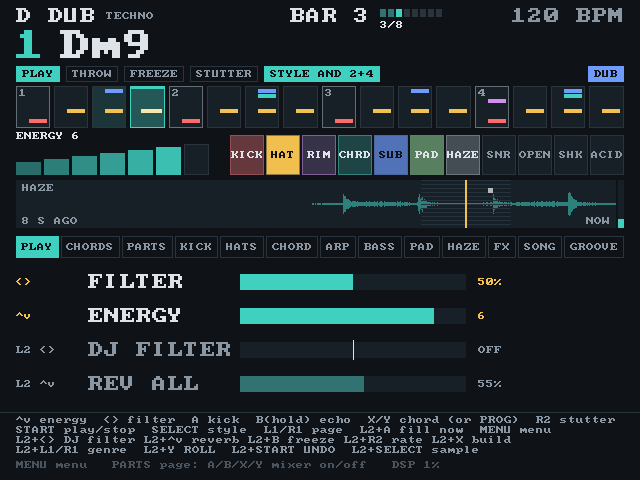
You should see
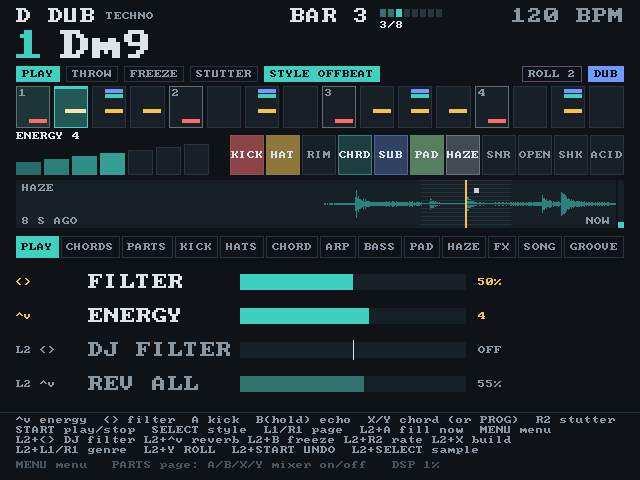
- Top row: the key and chord set (“D DUB”), the mode (“TECHNO”), the bar number, eight small boxes that count the bars of the phrase, and the tempo.
- Big chord name: the chord that is playing now.
- Badges: “PLAY” tells you it is running. Other badges appear when you use a move.
- Step strip: sixteen boxes, one per sixteenth note of the bar. A lit box is the step playing right now. Small coloured marks in a box show which parts play on that step.
- Energy stairs and part lights: how much of the groove is on, and a light for each part that flashes on every hit.
- Haze strip: a picture of the last 8 seconds of sound. We come back to it in Lesson 7.
- Four rows near the bottom: FILTER, ENERGY, DJ FILTER and REV ALL. These are the controls of this page.
You should hear: a steady kick, offbeat hats, short chord stabs with echo, and a low bass note.
Try this: count the beats in the step strip (1, 2, 3, 4). Tap your foot with the kick.
Lesson 2: Start, stop and volume
Goal: control the clock and the loudness.
Do this
- Press START (PC: Enter). The groove stops. The badge says “STOP NEXT BAR”: it stops on the bar line, not in the middle of a beat.
- Press START again. It starts at once, from step 1.
- Press VOL+ (PC: =) and VOL- (PC: -). Each press moves the master volume by 5 %.
You should hear: a clean stop at the end of the bar, and a clean start.
Try this: stop and start three times. Set the volume you like. It is saved for next time on the console.
Switching off: hold MENU (PC: Esc) for 1 second on the console. A yellow bar fills and the sound fades out. On the web, Esc only opens and closes the menu.
Lesson 3: ENERGY and FILTER
Goal: make the groove busier or emptier, and brighter or darker.
ENERGY is a dial from 0 to 7. It decides how many parts play. Each step up adds more. ENERGY starts at 4.
Do this (you are on the PLAY page)
- Press UP once. The stairs show “4 > 5 NEXT BAR”. On the next bar line ENERGY becomes 5.
- Press UP twice more, up to 7.
- Press DOWN until you reach 0.
- Go back to 4 with UP.
- Now press and hold RIGHT. FILTER opens. Then hold LEFT to close it.
Holding a direction on a smooth control like FILTER sweeps it. The longer you hold, the faster it goes. Let go to stop.
You should see: the part lights and the marks in the step strip appear and disappear as ENERGY moves. FILTER shows a percentage from 0 to 100 (it starts at 50).
You should hear
- In DUB, the ladder is: 0 pad and haze only; 1 kick; 2 hats; 3 chords; 4 bass; 5 rim click; 6 busier hats; 7 rim again and a louder haze.
- FILTER changes how bright the chord stabs are. Low is dark and muffled. High is open and bright.
Try this: go to ENERGY 0, then climb one step per bar to 7. Listen to each part join.
Lesson 4: Chords
Goal: change the chord on purpose.
The chords come from a set: eight chords in your key. In DUB the set is also called DUB.
Quick way (on the PLAY page)
- X (PC: S) goes to the next chord. Y (PC: A) goes to the previous one. They wrap around from 8 to 1.
Pick-a-chord way (the CHORDS page)
- Press R1 (PC: W) once. You are on the CHORDS page. It shows eight cells in two rows of four.
- Pick a chord. The buttons match the cells:
| Cell | 1 | 2 | 3 | 4 | 5 | 6 | 7 | 8 |
|---|---|---|---|---|---|---|---|---|
| Button | LEFT | DOWN | RIGHT | UP | Y | B | A | X |
- Try chord 1, then 6, then 3.
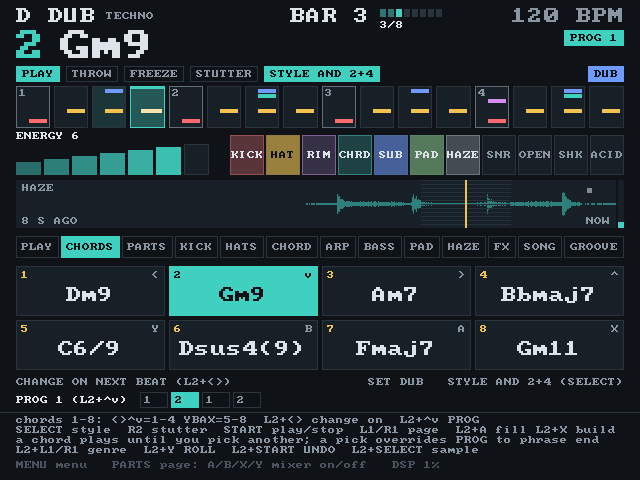
You should see: the picked cell lights up. A yellow outline means the chord is waiting for its beat. A chord stays until you pick another one.
On this page the face buttons (A, B, X, Y) pick chords. They do not kick, throw or step. Keep that in mind.
When does the chord change?
Hold L2 and press LEFT or RIGHT. This sets CHANGE ON:
- NEXT BEAT (the default): the chord changes on the next beat.
- NEXT BAR: it waits for the bar line. Smoother for slow music.
Ready-made chord walks
Hold L2 and press UP or DOWN. This sets PROG:
- HOLD (default): the chord stays until you pick another.
- PROG 1 to 4: GrainOS walks through eight bars of chords for you, and repeats. Small numbered boxes show the walk.
On the PLAY page and the sound pages (not CHORDS or PARTS), while a PROG runs, X and Y change the PROG number (1 to 4) instead of the chord. On the CHORDS page they still pick chords 8 and 5, which shows OVERRIDE. If you pick a chord by hand during a PROG, the screen shows “OVERRIDE” until the end of the 8-bar phrase.
Change the chord rhythm
Press SELECT (PC: Backspace) on any page except PARTS (there SELECT switches the selected part on or off). It steps through 12 chord styles. The change lands on the next bar. The ones to try first:
- OFFBEAT: stabs between the beats. The classic dub sound.
- AND 2+4: stabs after beat 2 and after beat 4. This is the DUB default.
- 3-3-2: a dotted pattern.
- ARP UP: the chord becomes a rising arpeggio (notes one after another).
- HOLD: the chord rings.
- OFF: no chord stabs.
The style and the set show at the bottom of the CHORDS page.
Try this: set CHANGE ON to NEXT BAR. Pick chords 1, 4, 5, 1 on the bar lines. Then switch to PROG 2 and listen to the machine do it for you.
Lesson 5: Muting parts and the mixer
Goal: take parts out to build tension, then put them back.
Kick on and off
On the PLAY page, press A (PC: Z). The kick switches off at the next bar line. Press A again to bring it back. This is a mute. A mute wins over ENERGY: even at ENERGY 7 a muted part stays silent.
The PARTS page
- Press R1 until you reach the PARTS page. It is the third tab, after PLAY and CHORDS. So from PLAY, press R1 twice.
- Press UP / DOWN to pick a part row. The list: KICK, HATS, RIM, CHORDS, SUB, PAD, HAZE, SNARE, OPEN, SHAKER, ACID.
- Press SELECT to switch the picked part on or off.
- Four buttons are quick switches here:
| Button | Part |
|---|---|
| A (PC: Z) | KICK |
| B (PC: X) | HATS |
| X (PC: S) | CHORDS |
| Y (PC: A) | SUB (the bass) |
On this page, B does not throw echo. It mutes the hats.
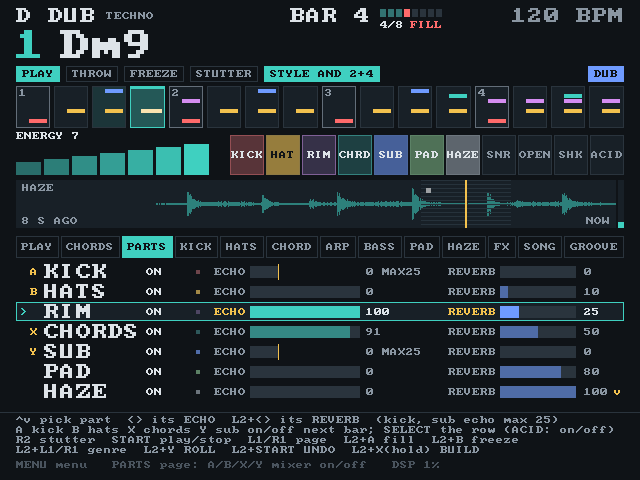
You should see: a part you turn off says ”-> OFF” or “MUTED” in its row. A part that ENERGY has not reached yet says “LOW”. Changes land on the next bar line.
Echo and reverb per part: with a part picked, LEFT/RIGHT changes how much of it goes into the echo. L2+LEFT/RIGHT changes its reverb. Hold to sweep. The kick and the sub echo are limited to 25 %, so the low end stays clean.
Try this: mute the hats and the chords. Leave only kick and bass for two bars. Then bring the chords back, then the hats.
Lesson 6: Pages and the four rows
Goal: learn how every page works. Then you can find anything.
Most pages show four controls. They follow one pattern:
| Buttons | Edits |
|---|---|
| LEFT / RIGHT | row 1 |
| UP / DOWN | row 2 |
| L2 + LEFT / RIGHT | row 3 |
| L2 + UP / DOWN | row 4 |
When you hold L2, rows 3 and 4 light up so you can see which ones you are about to change.
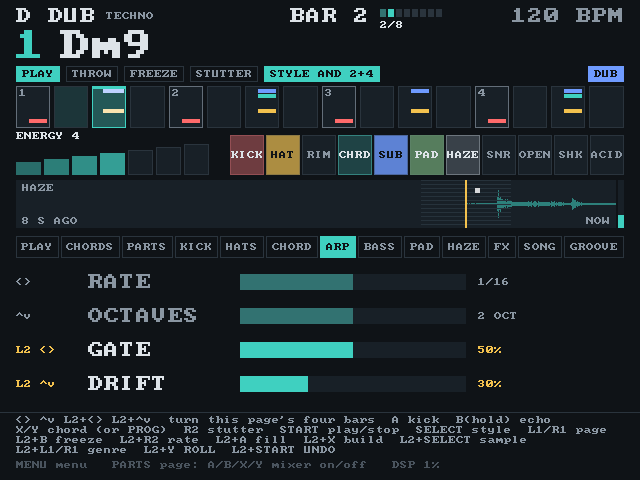
Press L1 / R1 to go to the previous or next page. The 13 pages, in order:
PLAY, CHORDS, PARTS, KICK, HATS, CHORD, ARP, BASS, PAD, HAZE, FX, SONG, GROOVE.
Do this
- Go to SONG (press R1 eleven times, or L1 twice from PLAY: the pages wrap around). The rows are GENRE, KEY, SET and TEMPO.
- Press UP or DOWN to change the KEY. The chords move to the new key on the next bar.
- Hold L2 and press UP. This raises the TEMPO. It repeats quickly if you hold. The range is 40 to 200 BPM.
- Return the tempo to 120 and the key to D.
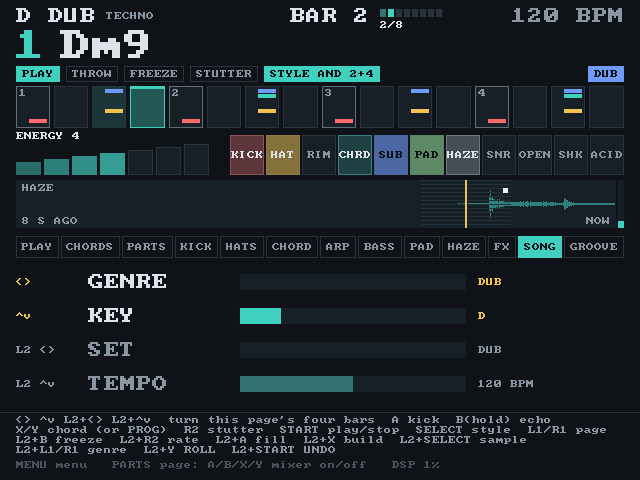
Try this: visit every page once. For each, press LEFT/RIGHT and UP/DOWN, then hold L2 and try again. If you get lost, press MENU and choose Help. It shows the four rows of the page you were on, and the buttons that work there.
Lesson 7: Moves with the echo and the haze
Goal: three live effects you can play with your hands: echo throw, freeze and stutter.
Echo throw
The chords always have a little echo. A throw sends them into the echo at full level.
Do this (not on the CHORDS or PARTS page)
- Hold B (PC: X) for about one beat.
- Let go.
You should see: a “THROW” badge while you hold.
You should hear: a burst of repeats of the chords. The repeats ring on for some seconds after you let go. The speed of the repeats follows the ECHO TIME on the FX page.
Freeze the haze
The haze is a cloud of tiny sound pieces (grains) cut from the last 8 seconds of the chords and the pad. It plays softly in the background.
Do this
- Press L2+B once. The haze freezes. The strip says “HAZE (FROZEN)” in blue.
- Change chords with X or Y.
- Press L2+B again to unfreeze.
You should hear: the old sound hangs in the cloud, while new chords play on top.
Stutter
Do this
- Hold R2 (PC: 2). It starts on the next grid line. Let go and it stops on the next grid line.
- Hold L2 and press R2 to change the rate: 1/8, 1/16 or 1/32. It starts at 1/16.
You should see: a “STUTTER” badge with the rate.
You should hear: a small slice of the whole mix repeating, like a stuck record. The rate sets how short the slice is. 1/32 is the fastest.
Try this: freeze the haze on a chord you like. Mute the kick (A). Throw the echo once on the next bar. Un-mute the kick and unfreeze together on a bar line.
Lesson 8: DJ filter and reverb
Goal: sweep the whole mix, like a DJ.
Do this (PLAY page)
- Hold L2 and press LEFT. The DJ FILTER moves to the left of the centre. This is a low-pass: it takes the high sounds away, so the mix becomes muffled.
- Hold L2 and press RIGHT. The sweep comes back to the centre and stops there. This is OFF. Press again to go on to the right side. This is a high-pass: it takes the low sounds away, so the mix gets thin.
- Hold L2 and press UP / DOWN to change REV ALL. It is the master amount of reverb (the sense of a room). It starts at 55 %.
You should hear: with the DJ FILTER at the far left, the mix is dull. At the far right, it is thin. At the centre it is untouched.
Try this: do a slow sweep to the left for four bars. Then come back to the centre on a bar line, together with a chord change.
Lesson 9: Fills and builds
Goal: make transitions.
Fill now
Press L2+A. The rest of this bar becomes a drum fill. If there are fewer than four steps left, the fill happens in the next bar. The header shows “FILL” in red.
Build and drop
A build is a rising section that ends in a drop.
Do this
- Hold L2+X (PC: Shift+S). Keep both buttons down for at least one full bar.
- Keep holding for up to eight bars.
- Let go.
You should hear: the hats get busier bar by bar, a rim click joins, and in the last bar the kick drops out and the hats ratchet (fast repeats). The echo repeats lift. The badge counts bars: “BUILD 1”, “BUILD 2” and so on.
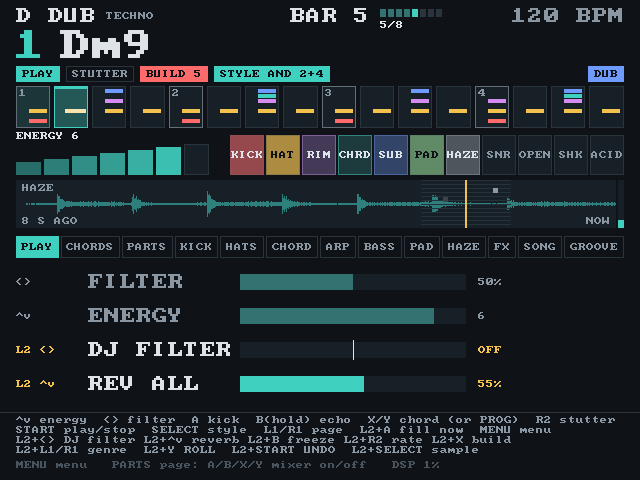
When you let go, the badge says “DROP NEXT BAR”. On the next bar line everything comes back at once. ENERGY goes up by one (to a maximum of 7), with an impact sound.
While the build runs you can let go of L2 and keep X held. Then R2 is a stutter again (with L2 held, R2 only changes the stutter rate).
A tap shorter than one bar does nothing. Pressing START (stop) cancels a build.
Try this: from ENERGY 4, hold a build for four bars. Let go of L2, keep X held, and add a stutter in the last bar. Let go and enjoy the drop.
Lesson 10: Change the genre
Goal: move the whole groove to a different style.
GrainOS has four genres:
| Genre | Tempo | What it is |
|---|---|---|
| DUB | 120 | Classic dub techno: offbeat stabs, long echo, deep and spacious. |
| DEEP HOUSE | 122 | Four-on-the-floor, claps on 2 and 4, open hats, shaker, swing. |
| LO-FI | 86 | Slow, dusty, swung beat with jazzy chords and tape hiss. |
| ACID | 130 | Straight sixteenth notes and a squelching 303-style bass line. |
Do this
- Hold L2 and press R1 (PC: Shift+W). This goes to the next genre.
- Hold L2 and press L1 to go to the previous one.
- Or open the SONG page and use LEFT / RIGHT on the GENRE row.
You should see: a badge like ”> DEEP HOUSE IN 5”. The number counts the bars left until the switch. The change lands on the next 8-bar phrase line, not on the next bar. If the jam is stopped, it switches at once.
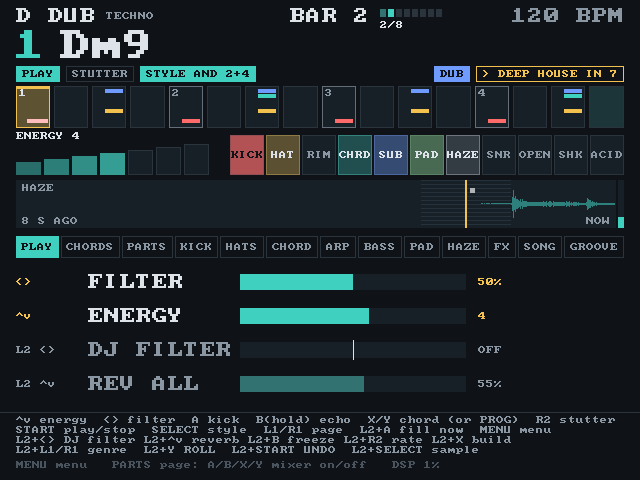
You should hear: the tempo glides to the new tempo over one bar. Then the drums, bass, chords, echo and haze all change to that genre’s sound.
What changes and what stays
- A genre switch rewrites many sounds: tempo, swing, chord set, chord style, chord sound, pad, haze, echo, kick and hat settings, and the echo and reverb of every part. So your edits to these are replaced.
- It keeps: your key, your ENERGY, your mutes, the volume and your DJ filter.
A quick tour of each genre
- DEEP HOUSE starts on PROG 1. At ENERGY 2 you get claps and open hats. At 5 a shaker joins.
- LO-FI also starts on PROG 1. The chords ring (style HOLD). The groove is lazy and swung. There is a lot of tape hiss.
- ACID starts at ENERGY 4 like the others. At ENERGY 2 the acid line joins. In ACID, the BASS page shows the acid line controls (CUTOFF, RESONANCE, ENV MOD, DECAY) instead of the sub bass controls.
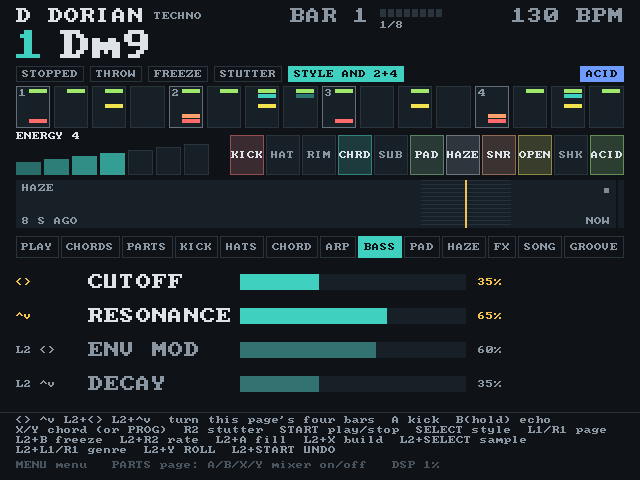
Try this: in ACID, go to the BASS page. Hold RIGHT to open the CUTOFF while the line plays. Hold L2+RIGHT to push the ENV MOD (how far each note sweeps the filter).
Lesson 11: ROLL and UNDO
Goal: get a new variation of the groove, and go back if you do not like it.
ROLL re-rolls the groove inside the current genre. You get small drum changes: ghost hats (very quiet hits), an extra rim click, a pick-up kick. It can also change the chord style, but only to styles that fit the genre.
Do this
- Press L2+Y (PC: Shift+A). It lands on the next bar line.
- Press it again a few times. Listen to each one.
- Press L2+START (PC: Shift+Enter). This is UNDO. It goes back one roll. You can go back up to 8 rolls.
You should see: a badge “ROLL 1”, “ROLL 2” and so on. When you are back at the genre’s own groove (ROLL 0), the badge disappears. If there is nothing left to undo, the badge flashes “NO UNDO”.
You can also roll from the menu: Roll groove and Undo roll.
Try this: roll until you like a groove. Then roll five more times. Use UNDO five times to come back.
Lesson 12: Make the groove swing
Goal: change how the groove feels, with the GROOVE page.
Go to the GROOVE page (it is the last tab, so press L1 once from PLAY).
| Row | Control | What it does |
|---|---|---|
| LEFT / RIGHT | FEEL | NORMAL, HALF-TIME, DOUBLE HATS, SHUFFLE |
| UP / DOWN | SWING | 0 to 30 %. Delays every second sixteenth note. |
| L2+LEFT / RIGHT | FILLS | OFF, FEW, LOTS |
| L2+UP / DOWN | HUMAN | 0 to 100 %. Hits fall slightly late, like a person playing. |
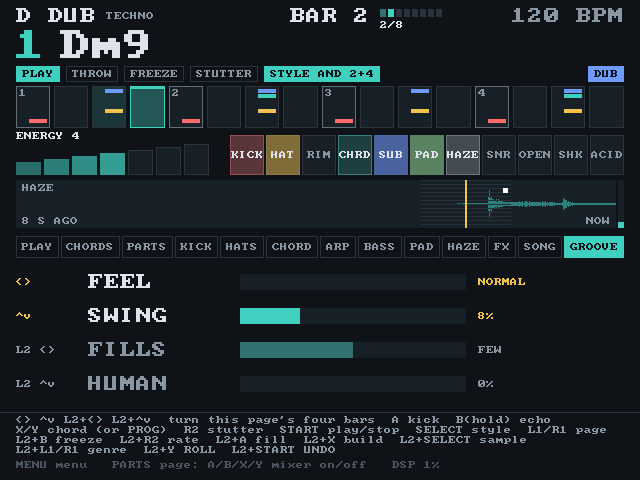
- HALF-TIME: the kick and snare use twice as much time. The beat feels slow while the tempo stays the same.
- DOUBLE HATS: twice as many hats.
- FILLS: FEW gives a small fill every fourth bar and a bigger one on the eighth. LOTS adds more.
- HUMAN: the kick stays on the grid. Everything else loosens.
Try this: set FEEL to HALF-TIME at the start of a phrase. Raise SWING to 20 %. Add a little HUMAN.
The five-minute performance
Now put it together. This plan is one path. Make your own. It assumes a fresh start: DUB, key D, ENERGY 4. At 120 BPM, one bar is two seconds, so eight bars (a phrase) are about 16 seconds.
| Time | What you do | Buttons |
|---|---|---|
| 0:00 | Start low. Mute the kick. Lower ENERGY to 2. | A, then DOWN twice |
| 0:30 | Open FILTER slowly while the hats play. | Hold RIGHT |
| 1:00 | Bring the kick back on a bar line. ENERGY to 4. | A, UP twice |
| 1:30 | Go to CHORDS. Pick PROG 1 and let it walk. | R1, then L2+UP |
| 2:00 | Go back to PLAY. Echo throw on the last beat of a phrase. | L1, then hold B |
| 2:30 | ROLL twice. Keep the one you like (UNDO if not). | L2+Y, L2+START |
| 3:00 | Start a build. Hold it for four bars. Let go of L2 but keep X down, then add a stutter in the last bar. | Hold L2+X, then R2 |
| 3:30 | Drop. ENERGY goes to 5 by itself. Push it to 7. | Let go, UP twice |
| 4:00 | Switch to DEEP HOUSE. It waits for the phrase line. | L2+R1 |
| 4:30 | Freeze the haze on a chord. Lower ENERGY step by step. | L2+B, DOWN |
| 5:00 | Sweep the DJ FILTER to the left. Stop on the bar line. | Hold L2+LEFT, START |
Tips
- Move on bar lines. Everything waits for them, so you cannot be out of time.
- Do one change at a time. Listen to it for a few bars.
- If you lose track, press MENU and choose Help.
- If a move goes wrong: Menu > New jam returns all the controls to the defaults of the current genre. It lands on the next bar line. Your volume stays.
Where to go next
- Play the chords yourself and loop them: 03-chord-mode.
- Short recipes (sample haze, mixing, surprises): 04-how-to.
- Sound design on the KICK, HATS, CHORD, ARP, PAD, HAZE and FX pages: 05-advanced.
- Every control, range and default in one place: 06-reference.