Reference
This page is a lookup table. It does not teach. If you are new, start with getting-started, then first-jam-techno and chord-mode. For step-by-step recipes see how-to and advanced.
Contents:
- Button names
- Buttons that work everywhere
- TECHNO buttons
- TECHNO pages and controls
- CHORD buttons
- CHORD pages and controls
- Genres
- Chord sets, keys and progressions
- Chord styles, sounds, colours, inversions, beats
- The menu
- settings.cfg and audio.cfg
- Files on the card
- Screen reading guide
- Glossary
How to read the tables: “Miyoo” is the handheld. “PC” is the desktop window. “Web” is the browser version at claudiodavi.com/grainos/. Where a name is given as “R2 (PC: 2)”, the first name is the Miyoo button and the second is the PC and web key. Screens always print the names of the platform you are on.
1. Button names
The keyboard letters are not the same as the Miyoo letters. The Miyoo A button is the Z key. The Miyoo Y button is the A key.
| Miyoo button | PC keyboard | Web keyboard | Web gamepad (standard mapping) |
|---|---|---|---|
| UP / DOWN / LEFT / RIGHT | Arrow keys | Arrow keys | D-pad |
| A | Z or Space | Z or Space | pad button 1 |
| B | X | X | pad button 0 |
| X | S | S | pad button 3 |
| Y | A | A | pad button 2 |
| L1 | Q | Q | pad button 4 |
| R1 | W | W | pad button 5 |
| L2 (the “shift” button) | Shift (either) or 1 | Left Shift, Right Shift or 1 | pad button 6 |
| R2 | 2 | 2 | pad button 7 |
| SELECT | Backspace | Backspace | pad button 8 |
| START | Enter | Enter | pad button 9 |
| MENU | Esc | Esc (only while the player has focus) | pad button 16 |
| VOL+ / VOL- | = and - | = and - | none |
| POWER | none | none | none |
Notes:
- On the Miyoo the four face buttons sit like a diamond: X top, A right, B bottom, Y left.
- The Miyoo POWER button does nothing inside GrainOS. To switch off, hold MENU for one second or use Menu > Power off. If the console is frozen, hold its power button for about 10 seconds.
- On the web, click the player first, or the keyboard will not reach it. If you see on-screen buttons, they are the Miyoo buttons.
- A browser gamepad with the “standard” mapping works like the Miyoo.
- In this guide, “L2+X” means: hold L2, then press X.
2. Buttons that work everywhere
These work in both modes, on every page. They run before the mode’s own buttons.
| Buttons | What it does |
|---|---|
| L1 / R1 | Previous / next page. Wraps around. |
| L2+L1 / L2+R1 | Previous / next flavour. TECHNO: the genre (DUB, DEEP HOUSE, LO-FI, ACID). CHORD: the chord set. Wraps around. |
| MENU (tap) | Open or close the menu. |
| MENU (hold 1 second) | Miyoo: power off. PC: quit. Web: nothing (Esc only opens or closes the menu). |
| VOL+ / VOL- | Master volume, up or down 5 %. Also works while the menu is open. |
| L2 | Shift. Hold it with another button for that button’s second function. |
With the menu open, button presses go to the menu, not the music. Button releases still reach the music, so nothing stays stuck.
Holding the d-pad
| Control type | What happens when you hold the direction |
|---|---|
| Stepped (GENRE, KEY, SET, TEMPO, ENERGY, STYLE and similar) | One step on the press. After 0.35 s it repeats. Repeat time: TEMPO 0.04 s, SWING 0.08 s, HUMAN 0.06 s (5 % per step), ENERGY 0.4 s, PROG / GENRE / FEEL 0.3 s, everything else 0.14 s. |
| Continuous (levels, filters, times shown as %, ms or dB) | Hold to sweep. It starts at 25 % of the whole range per second and speeds up the longer you hold. Let go to stop. |
| DJ FILTER | The sweep stops at the centre (OFF). Press again to go to the other side. |
Which control a held direction edits is decided the moment you press it.
The four rows of a page
On every “bar page” (a page with four bars), the d-pad edits the four rows:
| Buttons | Row |
|---|---|
| LEFT / RIGHT | Row 1 |
| UP / DOWN | Row 2 |
| L2+LEFT / L2+RIGHT | Row 3 |
| L2+UP / L2+DOWN | Row 4 |
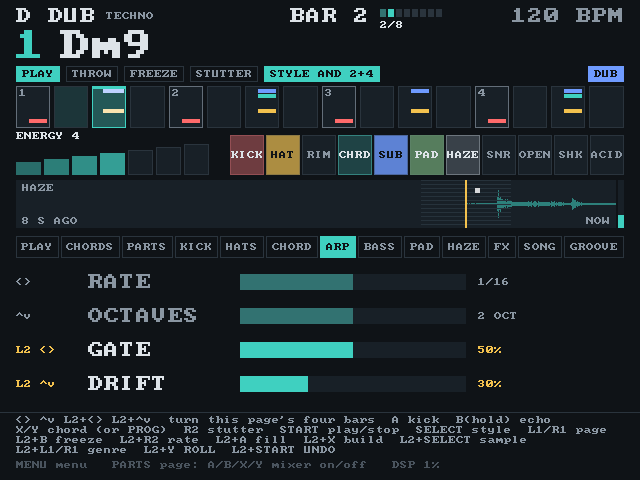
Rows 3 and 4 light up when you hold L2. See img/guide_techno_arp_l2.png:
3. TECHNO buttons
TECHNO has 13 pages, in this order: PLAY, CHORDS, PARTS, KICK, HATS, CHORD, ARP, BASS, PAD, HAZE, FX, SONG, GROOVE. It starts on PLAY.
3.1 Buttons that work on almost every TECHNO page
| Buttons | What it does | When it lands |
|---|---|---|
| START | Play / stop. Stop waits for the bar line (badge “STOP NEXT BAR”). Play starts at once at step 1. | Stop: bar line |
| SELECT | Next chord style (12 styles, wraps). Quick taps keep walking forward. Not on PARTS: there SELECT switches the selected part on or off. | Next bar |
| L2+SELECT | Next haze source: LIVE, then each WAV sample, then back to LIVE. Does nothing if no samples are loaded. | At once |
| R2 (PC: 2), hold | STUTTER: a beat-repeat of the whole mix. Starts on a grid line, stops on the next grid line after you let go. | Grid line |
| L2+R2 | Stutter rate: 1/8, 1/16, 1/32. Starts on 1/16. Not a stutter by itself. | At once |
| B (PC: X), hold | ECHO THROW: echo send jumps to full, repeat level to 85 %. Echoes ring on after you let go. | At once |
| L2+B | FREEZE the haze. Press once to freeze, again to unfreeze. | At once |
| A (PC: Z) | Kick on / off (a mute of the kick part). | Next bar |
| L2+A | FILL NOW: the rest of this bar becomes a fill. If fewer than 4 steps are left, the next bar does. | Now / next bar |
| L2+X (PC: Shift+S), hold | BUILD. Let go to DROP. See below. | Drop: next bar line |
| L2+Y | ROLL: a new groove variation inside the genre. | Next bar line |
| L2+START | UNDO the last ROLL, up to 8 steps back. With nothing to undo, the badge flashes “NO UNDO”. | Next bar line |
| X / Y | Next / previous chord of the set (1 to 8, wraps). With a PROG running they change the PROG number (1 to 4) instead. Not on CHORDS or PARTS (see section 3.2). | Next beat or bar (CHANGE ON) |
| L1 / R1, L2+L1 / L2+R1, MENU, VOL | See section 2. |
BUILD and DROP. Hold L2+X for at least one whole bar. A build runs up to 8 bars:
| Bar of the build | What is added |
|---|---|
| 2 | 8th-note hats |
| 3 | 16th-note hats |
| 4 | rim on the off-beats |
| 6 | rim on 8ths |
| last bar (the bar you let go in, or bar 8) | hat ratchets (fast repeated hits), no kick |
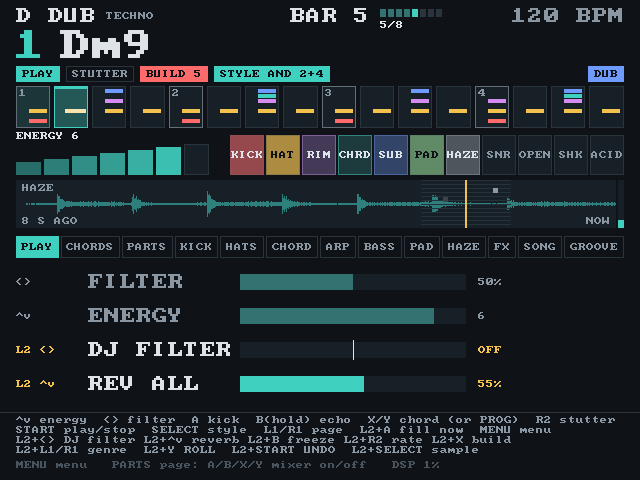
Echo repeats lift during the build. Badge: “BUILD n” (n is the number of bars). Let go: the badge says “DROP NEXT BAR”. On the next bar line everything comes back, ENERGY goes up by 1 (maximum 7) and an impact sound plays. A tap shorter than one bar does nothing. Stopping with START cancels a build.
3.2 Exceptions on some pages
| Page | What is different |
|---|---|
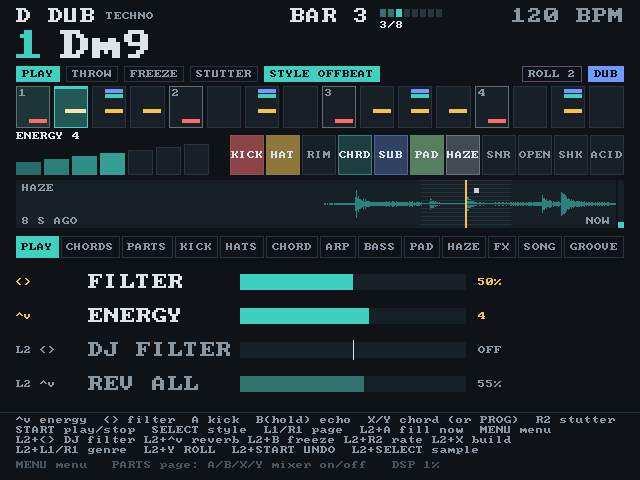
| PLAY | The d-pad edits FILTER / ENERGY / DJ FILTER / REV ALL. |
| CHORDS | The d-pad and the face buttons pick chords (see 4, CHORDS). A, B, X, Y are not kick, throw, next and previous here. L2+face buttons still do fill, freeze, build, roll. |
| PARTS | UP/DOWN pick a part. LEFT/RIGHT edit its echo send, L2+LEFT/RIGHT its reverb send. A, B, X, Y switch kick, hats, chords, sub on and off. B does not throw here. SELECT switches the selected row on or off (it does not change the chord style). |
| BASS in ACID genre | Shows the acid line rows instead of the sub rows. |
| All other bar pages | A kick, B echo throw, X / Y chord, d-pad edits the four rows. |
A mute (a part switched off by hand) wins over ENERGY. It lands on the bar line.
4. TECHNO pages and controls
Defaults are for the DUB genre at power-on. Switching genre rewrites many of them (see section 7).
PLAY
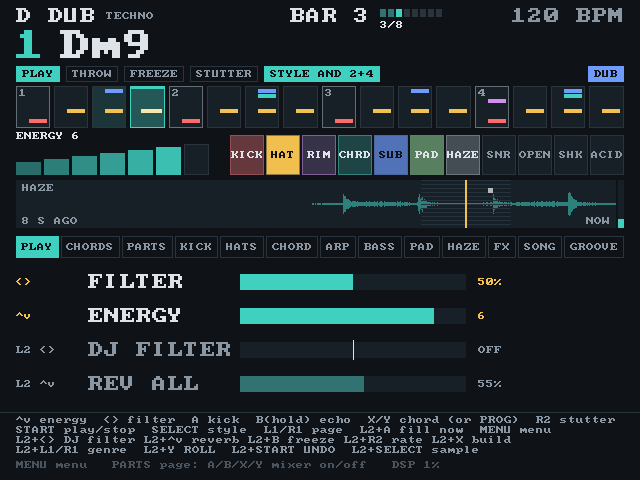
| Buttons | Control | Range shown | Default | What it does |
|---|---|---|---|---|
| LEFT / RIGHT | FILTER | 0-100 % | 50 % | Brightness of the chord stabs. Low is dark and muffled, high is open. |
| UP / DOWN | ENERGY | 0-7 | 4 | How much of the groove plays. Lands on the next bar. 0 is only pad and haze. |
| L2+LEFT / RIGHT | DJ FILTER | LOW-PASS 100 % … OFF … HIGH-PASS 100 % | OFF | A DJ-style sweep on the whole mix. Left of centre removes highs. Right of centre removes lows. Centre is off. |
| L2+UP / DOWN | REV ALL | 0-100 % | 55 % | Master reverb amount. Scales every part’s reverb send. |
CHORDS
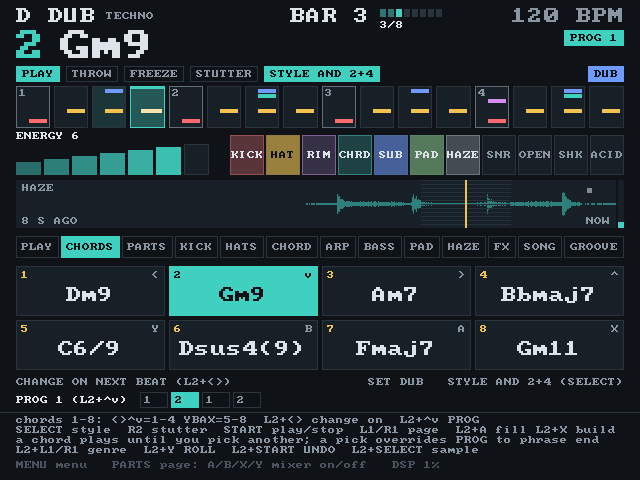
The page shows a grid of 8 chords (two rows of four). The lit cell is playing. A yellow outline means it waits for its beat or bar. A chord keeps playing until you pick another.
| Buttons | Chord |
|---|---|
| LEFT, DOWN, RIGHT, UP | Chords 1, 2, 3, 4 |
| Y, B, A, X (PC: A, X, Z, S) | Chords 5, 6, 7, 8 |
| Buttons | Control | Range shown | Default | What it does |
|---|---|---|---|---|
| L2+LEFT / RIGHT | CHANGE ON | NEXT BEAT, NEXT BAR | NEXT BEAT | When a picked chord starts. |
| L2+UP / DOWN | PROG | HOLD, PROG 1, 2, 3, 4 | HOLD | HOLD keeps the chord until you pick another. PROG n plays a ready-made 8-bar chord walk. Lands on the next bar. |
A manual pick while a PROG runs shows OVERRIDE until the 8-bar phrase ends. The PROG lists are in section 8.
PARTS (the mixer)
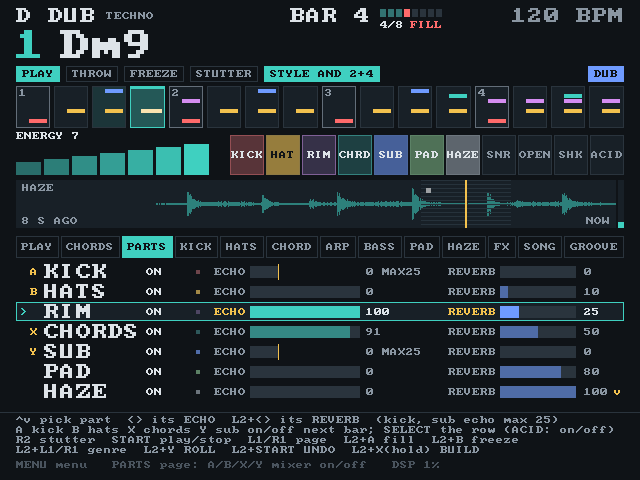
| Buttons | What it does |
|---|---|
| UP / DOWN | Pick the part row. Wraps. 11 rows, 7 visible. |
| LEFT / RIGHT | The part’s ECHO send (hold to sweep). |
| L2+LEFT / RIGHT | The part’s REVERB send. |
| L2+UP / DOWN | Nothing. |
| A / B / X / Y | Kick / hats / chords / sub on or off (next bar). |
| SELECT | Switch the selected row on or off. On the ACID row: ACID ON / OFF. |
Rows and their colours, with default echo and reverb sends (DUB):
| Part | Colour | Echo send | Reverb send |
|---|---|---|---|
| KICK | red | 0 | 0 |
| HATS | gold | 0 | 10 |
| RIM | purple | 85 | 25 |
| CHORDS | teal | 91 | 50 |
| SUB | blue | 0 | 0 |
| PAD | green | 0 | 80 |
| HAZE | grey | 0 | 100 |
| SNARE | orange | 20 | 30 |
| OPEN (open hat) | yellow | 0 | 10 |
| SHAKER | pink | 0 | 10 |
| ACID | lime | 30 | 10 |
Kick and sub echo are capped at 25 %. The bar shows “MAX25”.
Row state text:
| Text | Meaning |
|---|---|
| ON / OFF | Playing / not playing. |
| -> ON | Waiting for the bar line. |
| MUTED | Switched off by hand. |
| LOW | Off because ENERGY is too low for this part. |
KICK
| Buttons | Control | Range shown | Default | What it does |
|---|---|---|---|---|
| LEFT / RIGHT | TUNE | -12 to +12 semitones | +0 | Pitch of the kick, relative to the key. |
| UP / DOWN | DECAY | 200-600 ms | 360 ms | How long the kick rings. |
| L2+LEFT / RIGHT | PUNCH | 0-100 % | 50 % | Click and pitch sweep at the start. |
| L2+UP / DOWN | DRIVE | 0-100 % | 20 % | Grit (saturation). |
HATS
| Buttons | Control | Range shown | Default | What it does |
|---|---|---|---|---|
| LEFT / RIGHT | LEVEL | 0-100 % | 50 % | Hat volume. |
| UP / DOWN | DECAY | 27-340 ms | 27 ms | Short (closed) to long (open). |
| L2+LEFT / RIGHT | TONE | 0-100 % | 50 % | Dark to bright. |
| L2+UP / DOWN | OPEN | 0-100 % | 50 % | Level of the open hat. Only genres that have one: DEEP HOUSE and ACID. |
CHORD (the stab sound)
| Buttons | Control | Range shown | Default | What it does |
|---|---|---|---|---|
| LEFT / RIGHT | LEVEL | OFF to +1.0 dB | -5.0 dB | Stab volume. |
| UP / DOWN | SOUND | PAD, GLASS, ORGAN, PULSE | PAD | The stab’s tone. Lands on the next bar. |
| L2+LEFT / RIGHT | DECAY | 80-600 ms | 366 ms | Length of each stab. |
| L2+UP / DOWN | RESONANCE | 0-100 % | 45 % | Filter whistle at the cutoff. |
ARP
RATE and OCTAVES work with the four ARP styles. GATE sets the note length of ARP, BROKEN and PULSE. DRIFT works on every style.
| Buttons | Control | Range shown | Default | What it does |
|---|---|---|---|---|
| LEFT / RIGHT | RATE | 1/8, 1/16, 1/8 TRIPLET | 1/16 | Speed. Lands on the next bar. With the triplet rate the echo time switches itself to 1/4T. |
| UP / DOWN | OCTAVES | 1, 2, 3 OCT | 2 OCT | How many octaves it climbs. |
| L2+LEFT / RIGHT | GATE | 0-100 % | 50 % | Note length. |
| L2+UP / DOWN | DRIFT | 0-100 % | 30 % | Slow wander of the chord filter over 8 to 16 bars, locked to the tempo. |
BASS
Normal face (DUB, DEEP HOUSE, LO-FI): the SUB, a low sine bass under the chord root.
| Buttons | Control | Range shown | Default | What it does |
|---|---|---|---|---|
| LEFT / RIGHT | LEVEL | 0-100 % | 50 % | Sub volume. |
| UP / DOWN | LENGTH | 0-100 % | 50 % | Note length. |
| L2+LEFT / RIGHT | OCTAVE | -1 OCT, 0 OCT | 0 OCT | Octave of the sub. |
| L2+UP / DOWN | PATTERN | OFFBEAT, HELD, OFF | OFFBEAT | OFFBEAT: on the off-beat 8ths. HELD: one long note per bar. OFF: no sub. Lands on the next bar. |
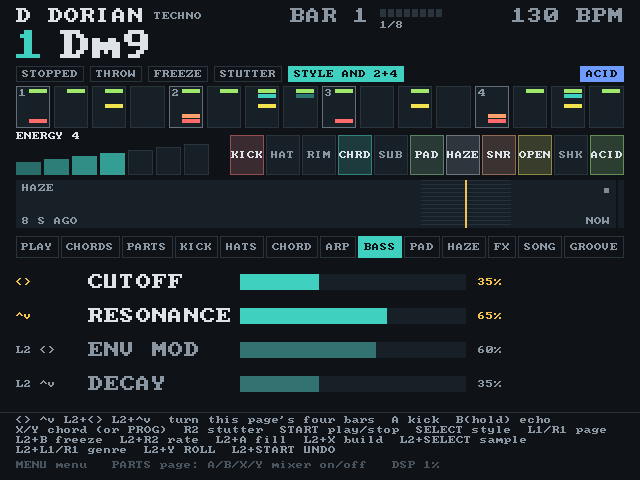
ACID genre only: the acid line (a squelchy 303-style bass) replaces the sub.
| Buttons | Control | Range shown | Default (ACID genre) | What it does |
|---|---|---|---|---|
| LEFT / RIGHT | CUTOFF | 0-100 % | 35 % | How open the filter is. |
| UP / DOWN | RESONANCE | 0-100 % | 65 % | Squelch. |
| L2+LEFT / RIGHT | ENV MOD | 0-100 % | 60 % | How far each note sweeps the filter. |
| L2+UP / DOWN | DECAY | 0-100 % | 35 % | How fast the sweep falls (0.1 to 0.8 s). |
(Outside the ACID genre these four have the starting values 40 %, 60 %, 50 % and 40 %.)
PAD
| Buttons | Control | Range shown | Default | What it does |
|---|---|---|---|---|
| LEFT / RIGHT | SOUND | WARM, STRINGS, CHOIR, DARK | WARM | The pad’s voice. |
| UP / DOWN | LEVEL | 0-100 % | 25 % | Pad volume. |
| L2+LEFT / RIGHT | BRIGHT | 0-100 % | 45 % | Dark to bright. |
| L2+UP / DOWN | ATTACK | 0.1-3.0 s | 0.3 s | How slowly the pad swells in, on start and on each chord change. |
HAZE
| Buttons | Control | Range shown | Default | What it does |
|---|---|---|---|---|
| LEFT / RIGHT | CHARACTER | MIST, SHIMMER, DEEP, SHARDS | MIST | The haze’s flavour. |
| UP / DOWN | AMOUNT | 0-100 % HAZE | 45 % | How much haze is mixed in. |
| L2+LEFT / RIGHT | SIZE | 10-1000 ms | 158 ms | Grain size. Small is grainy, large is smooth. |
| L2+UP / DOWN | HISS | 0-100 % | 15 % | Tape and vinyl noise bed and crackle. |
FX
| Buttons | Control | Range shown | Default | What it does |
|---|---|---|---|---|
| LEFT / RIGHT | ECHO TIME | 1/8, DOTTED 1/8, 1/4 | DOTTED 1/8 | Delay between echoes. Shows “1/4T (AUTO)” while the triplet arp drives it. |
| UP / DOWN | FEEDBACK | 0-100 % | 62 % | How many repeats the echo makes. |
| L2+LEFT / RIGHT | ECHO ALL | 0-100 % | 65 % | Master echo amount. Scales every part’s echo send. |
| L2+UP / DOWN | DUCK | 0-100 % | 55 % | The kick pushes chords and pad down (sidechain pump). |
SONG
| Buttons | Control | Range shown | Default | What it does |
|---|---|---|---|---|
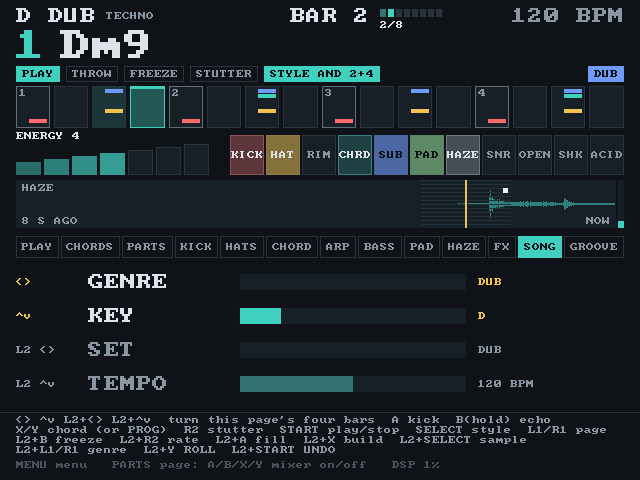
| LEFT / RIGHT | GENRE | DUB, DEEP HOUSE, LO-FI, ACID | DUB | Lands on the next 8-bar line. Shows ”> DEEP HOUSE IN n” while waiting. |
| UP / DOWN | KEY | 12 keys, C to B | D | Key of the chords. Next bar. |
| L2+LEFT / RIGHT | SET | DUB, DEEP, MELANCHOLY, DREAMY, DORIAN, SUS, PLANE, LOFI | DUB | Chord set. Next bar. |
| L2+UP / DOWN | TEMPO | 40-200 BPM | 120 | Repeats fast when held. |
GROOVE
| Buttons | Control | Range shown | Default | What it does |
|---|---|---|---|---|
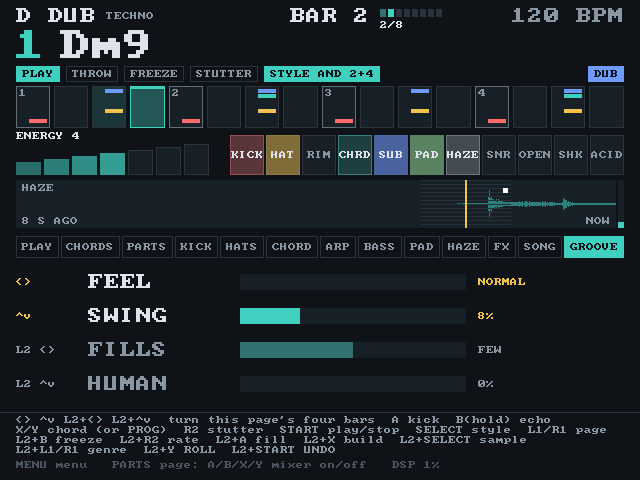
| LEFT / RIGHT | FEEL | NORMAL, HALF-TIME, DOUBLE HATS, SHUFFLE | NORMAL | Next bar. HALF-TIME stretches the kick and snare/clap over twice the time. DOUBLE HATS doubles hat density (new hits are soft). SHUFFLE forces at least triplet swing (33 %). |
| UP / DOWN | SWING | 0-30 % | 8 % | Delay of the odd 16th notes. 33 % would be triplet. |
| L2+LEFT / RIGHT | FILLS | OFF, FEW, LOTS | FEW | Automatic fills. FEW: small turnaround every 4th bar, big fill on the 8th. LOTS: also a small one on bars 2 and 6 about half the time. Lands on the next bar. |
| L2+UP / DOWN | HUMAN | 0-100 % | 0 % | Timing looseness. Hits fall slightly late, in 5 % steps. The kick stays on the grid in most genres. |
5. CHORD buttons
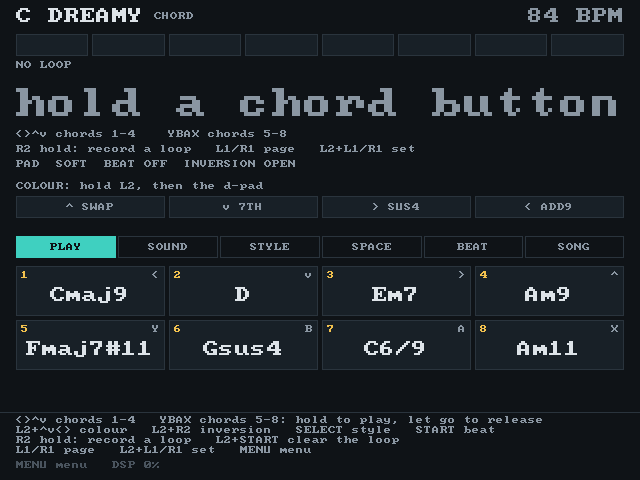
CHORD has 6 pages, in this order: PLAY, SOUND, STYLE, SPACE, BEAT, SONG. It starts on PLAY. The clock always runs. Nothing sounds until you hold a chord button.
5.1 Chord buttons
| Buttons | Chord |
|---|---|
| LEFT, DOWN, RIGHT, UP | Chords 1, 2, 3, 4 (PLAY page only) |
| Y, B, A, X (PC: A, X, Z, S) | Chords 5, 6, 7, 8 (on every page, even with L2 held) |
Hold to play. Let go to release. The sound rings out for the RELEASE time. If you hold several, the newest sounds. When you let go of it, the one underneath sounds again (a stack of up to 8).
5.2 All CHORD buttons
| Buttons | What it does |
|---|---|
| L2+UP | Colour SWAP: major to minor and back (the third moves). Toggle. |
| L2+DOWN | Colour 7TH: adds the 7th (nothing changes if the chord has one). Toggle. |
| L2+RIGHT | Colour SUS: first press SUS4, second press SUS2, third press off. |
| L2+LEFT | Colour ADD9: adds the 9th (nothing changes if the chord has one). Toggle. |
| L2+R2 | Next inversion: ROOT, 1ST, 2ND, OPEN, wraps. Works on any page. R2 alone never changes it. |
| R2 (PC: 2), hold | Record a loop. Works on any page. |
| L2+START | Clear the loop at once. With no loop, the loop row flashes “NO LOOP TO CLEAR” for 1.5 s. |
| SELECT | Next chord style: PAD, STRUM, HARP, PULSE. Any page. |
| START | Beat on / off. The first time it starts BRUSH. Later it resumes the last beat you used. Any page. |
| L1 / R1 | Previous / next page. |
| L2+L1 / L2+R1 | Previous / next chord set. Applies at once. |
| MENU, VOL | As in section 2. |
On pages other than PLAY, the d-pad edits the four rows (section 2) while Y B A X still play chords 5 to 8. On the PLAY page, the d-pad plays chords 1 to 4, and L2 turns it into the colour buttons.
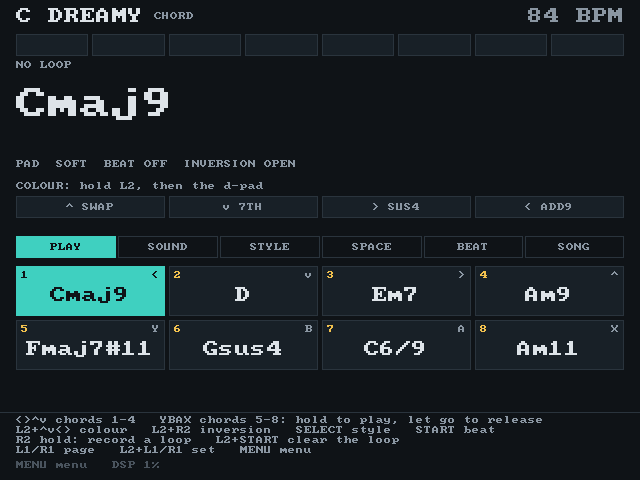
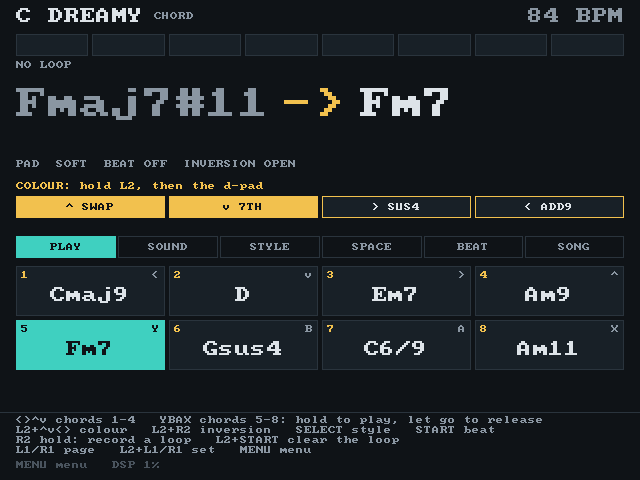
Colour rules.
- The colour belongs to the chord you hold. It also changes a chord that is already sounding (the notes glide).
- A new chord pressed without L2 starts plain again.
- A chord pressed while L2 is held keeps the colour.
- Order that works: hold a face-button chord, then hold L2 and tap the d-pad. Or hold L2 and the d-pad first, then press a face button chord.
- If the d-pad direction is already held as a chord button, pressing it again is ignored. Use a face button for the chord while you colour with the d-pad.
The big chord name shows plain name, an arrow, and the coloured name, for example “Fmaj7#11 -> Fm7”. Chips under it show ”^ SWAP”, “v 7TH”, ”> SUS4” (or ”> SUS2”), ”< ADD9”. They light yellow when on.
Not in CHORD mode: stutter, throw, freeze, fill, build, ROLL, UNDO, ENERGY. The L2+SELECT sample shortcut is TECHNO only, but a sample chosen in Menu > Samples also feeds the haze in CHORD mode.
5.3 The looper
Everything snaps to the 8th note (8 slots a bar). A loop can be up to 8 bars. It records the chord buttons you play, with their colour and inversion.
| You do | What happens | Screen text |
|---|---|---|
| Hold R2 | Waits for the next bar line. | “REC: starts on the bar line” (yellow) |
| Keep holding | Records. | “RECORDING bar n” (red) |
| Let go of R2 | The bar you are in finishes, then the loop closes and plays from its start. | “REC: closing on the bar line”, then “LOOP n BARS” (teal) |
| Let go before the first bar line | Cancels. | |
| Reach 8 bars | Closes by itself. | |
| Hold R2 while a loop plays | OVERDUB: from the next bar line, each bar that starts while R2 is held is replaced by what you play (or a rest). Let go mid-bar: that bar finishes, then it plays normally. | “OVERDUB bar x of n” (red) |
| L2+START | Clears everything. |
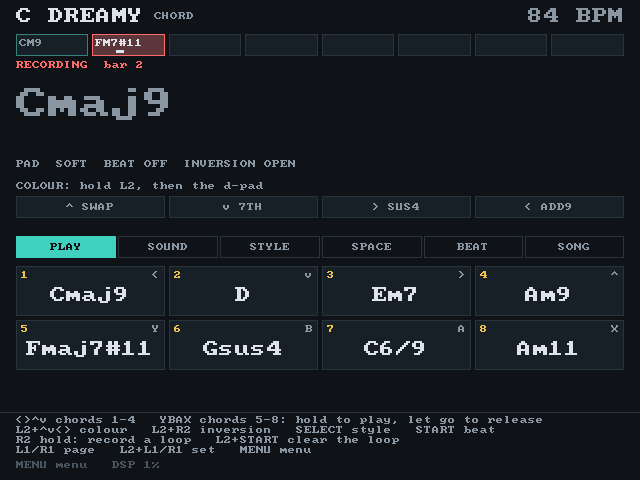
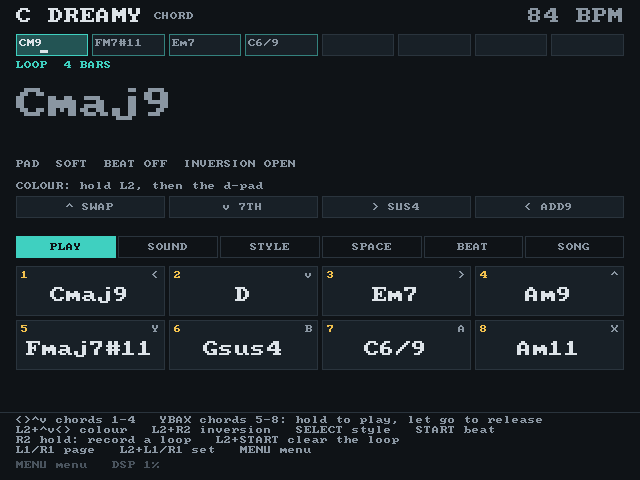
More facts:
- A press lands on the nearest 8th. A tap lasts at least one 8th.
- A recording with no chord in it is dropped.
- While a loop plays, a chord you hold by hand replaces the loop’s chord. The loop’s chord comes back when you let go. Chord cells turn purple when they are the looped chord and nobody is holding them.
- The loop row has 8 boxes, one per bar. Each shows the chord at the bar’s first 8th in short spelling (maj becomes M, sus becomes s, add becomes a, at most 7 letters), a ”+” if the chord changes more than once inside the bar, and a white play head. Boxes beyond the loop are dim. ”-” is a rest.
- The loop is lost when you change mode, switch off, or choose New jam.
- You do not need a beat for the loop. The bar line comes from the tempo clock.
6. CHORD pages and controls
PLAY has no bar rows. See section 5. On the other pages the d-pad edits four rows (SONG has three).
SOUND
| Buttons | Control | Range shown | Default | What it does |
|---|---|---|---|---|
| LEFT / RIGHT | SOUND | SOFT, KEYS, GLASS, STRINGS | SOFT | The voice. See section 9. |
| UP / DOWN | ATTACK | 5 ms to 1.5 s | 65 ms | How fast a chord fades in. |
| L2+LEFT / RIGHT | RELEASE | 40 ms to 6.0 s | 629 ms | How long it rings after you let go. |
| L2+UP / DOWN | BRIGHTNESS | 0-100 % | 50 % | Dark to bright. |
STYLE
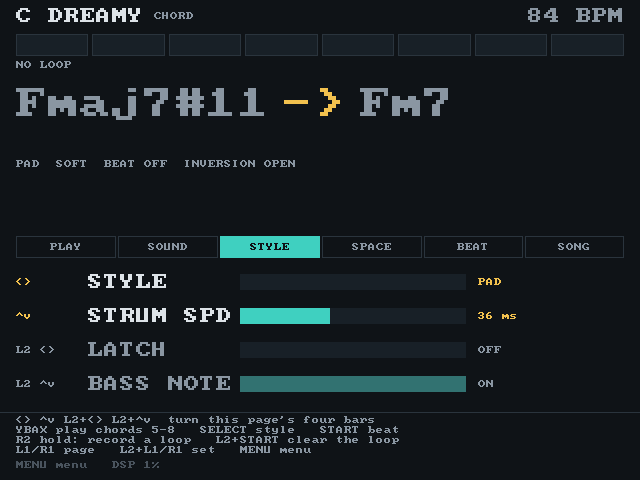
| Buttons | Control | Range shown | Default | What it does |
|---|---|---|---|---|
| LEFT / RIGHT | STYLE | PAD, STRUM, HARP, PULSE | PAD | How the chord is played. |
| UP / DOWN | STRUM SPEED | 20-60 ms | 36 ms | Gap between strummed notes. STRUM style only. |
| L2+LEFT / RIGHT | LATCH ON BEAT | OFF, ON THE BEAT | OFF | ON: a chord press, and its release, wait for the next beat line. |
| L2+UP / DOWN | BASS NOTE | OFF, ON | ON | A low sine bass note, the chord’s root, low down (G1 to F#2), under the chord. |
SPACE
| Buttons | Control | Range shown | Default | What it does |
|---|---|---|---|---|
| LEFT / RIGHT | CHORUS | OFF, 1-100 % | 50 % | Stereo thickening. |
| UP / DOWN | REVERB | 0-100 % | 80 % | The room (a large one). |
| L2+LEFT / RIGHT | ECHO | 0-100 % | 30 % | Echo amount. |
| L2+UP / DOWN | HAZE | 0-100 % HAZE | 30 % | The haze records the chords and plays back a cloud of grains. |
BEAT
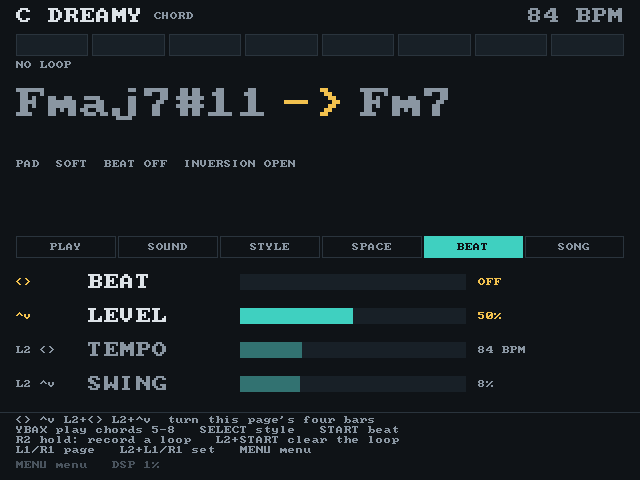
| Buttons | Control | Range shown | Default | What it does |
|---|---|---|---|---|
| LEFT / RIGHT | BEAT | OFF, BRUSH, LO-FI | OFF | See section 9. |
| UP / DOWN | LEVEL | 0-100 % | 50 % | Beat volume. |
| L2+LEFT / RIGHT | TEMPO | 40-200 BPM | 84 | Shared with SONG. |
| L2+UP / DOWN | SWING | 0-30 % | 8 % | Delay of odd 16ths. Also moves the harp’s plucks. |
SONG
| Buttons | Control | Range shown | Default | What it does |
|---|---|---|---|---|
| LEFT / RIGHT | KEY | C to B | C | Chords move to the new key at once. |
| UP / DOWN | SET | DUB, DEEP, MELANCHOLY, DREAMY, DORIAN, SUS, PLANE, LOFI | DREAMY | Chord set (also L2+L1 / L2+R1 anywhere). |
| L2+LEFT / RIGHT | TEMPO | 40-200 BPM | 84 | Same tempo as the BEAT page. |
Voice leading. When you change chord while one is held, each note slides (about 5 ms) to the nearest note of the new chord. It does not restart. Your inversion is a preference. The engine keeps it unless another voicing is clearly smoother. Chords sit in a fixed pitch range (MIDI notes 43 to 88; MIDI numbers the keys of a piano), so the lowest note is never below G2. In STRUM style each new chord is strummed again instead of gliding.
First-entry defaults in a session: key C, set DREAMY, tempo 84 BPM, sound SOFT, style PAD, inversion OPEN, chorus 50 %, reverb 80 %, echo 30 %, haze 30 %, beat OFF, bass note ON, latch off.
7. Genres
Switch with L2+L1 / L2+R1 or SONG > GENRE. The switch lands on the next 8-bar phrase line (at once if stopped). The tempo glides to the new one over one bar. Badge: ”> DEEP HOUSE IN n”.
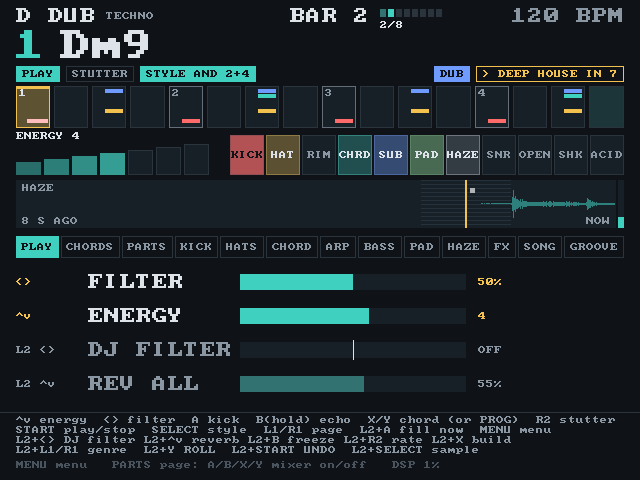
A genre switch rewrites: tempo, swing, feel, human, chord set, chord style, PROG, chord sound, haze character and amount, echo time, feedback, hiss, pad sound, stab decay and filter, duck, kick values, hat values, open / snare / shaker level, sub pattern and level, all acid settings, dust, and every echo and reverb send. It keeps: key, ENERGY, mutes, fills, volume, DJ filter, REV ALL, ECHO ALL, sound source.
| DUB | DEEP HOUSE | LO-FI | ACID | |
|---|---|---|---|---|
| Tempo | 120 | 122 | 86 | 130 |
| Swing | 8 % | 16 % | 25 % | 0 % |
| Human | 0 | 20 | 40 | 0 |
| Feel | NORMAL | NORMAL | NORMAL | NORMAL |
| Chord set | DUB | DEEP | LOFI | DORIAN |
| Chord style | AND 2+4 | 3-3-2 | HOLD | AND 2+4 |
| PROG | HOLD | PROG 1 | PROG 1 | HOLD |
| Chord sound | PAD | ORGAN | GLASS | PULSE |
| Pad | WARM | STRINGS | WARM | DARK |
| Haze | MIST 45 % | SHIMMER 30 % | DEEP 55 % | MIST 20 % |
| Echo | dotted 1/8, feedback 62 % | 1/8, feedback 45 % | 1/4, feedback 55 % | dotted 1/8, feedback 50 % |
| Hiss / dust | 15 % / 0 | 10 % / 0 | 40 % / 50 % | 8 % / 0 |
| Kick | tune 0, decay 360, punch 50, drive 20 | tune -1, decay 512, punch 35, drive 15 | tune -2, decay 400, punch 25, drive 45 | tune +1, decay 340, punch 70, drive 30 |
| Duck | 55 % | 70 % | 30 % | 50 % |
| Kit | kick, hats, rim | kick, clap, open hat, closed hats, shaker, rim, sub | kick, snare, hats, rim, sub | kick, clap, open hats, closed hats, rim, acid line |
| Bass | sub, offbeat | sub, offbeat | sub, held | acid line (sub is off) |
| ROLL variations | 4 | 6 | 7 | 6 |
| ROLL may change chord style to | OFFBEAT, 3-3-2, AND 2+4, SPARSE | OFFBEAT, 3-3-2, AND 2+4, PULSE | BROKEN, HOLD | AND 2+4, SPARSE, OFF, PULSE |
In LO-FI you can still choose HALF-TIME on the GROOVE page.
ENERGY ladders
Each level keeps all the lower ones.
| Level | DUB | DEEP HOUSE | LO-FI | ACID |
|---|---|---|---|---|
| 0 | pad + haze | pad + haze | pad + haze | pad + haze |
| 1 | kick | kick | kick | kick |
| 2 | hats (off-beat 8ths) | clap + open hat | snare + lazy hats | acid line + open hats |
| 3 | chords | closed hats + chords | chords | clap |
| 4 | sub | sub | sub (held) + ghost kick | chords |
| 5 | rim on beat 4 | shaker (8ths) | ghost snare + rim | closed hats |
| 6 | busier hats | hats around the kick, ghost clap, rim, shaker 16ths | fuller hats | busier hats, ghost clap, rim |
| 7 | rim on beat 2 too; haze 1.5 times louder | ghost clap pair, pick-up open hat | busiest, 16th hat ghosts | hat pick-up, more rim |
The kick is dead on the grid. HUMAN moves it only a little in LO-FI.
Chord styles in TECHNO (SELECT cycles; 12)
| Style | What it plays |
|---|---|
| OFFBEAT | Stabs on the off-beat 8ths (the dub sound). |
| 3-3-2 | Dotted rhythm: 3 + 3 + 2 steps. |
| AND 2+4 | Hits on the “and” of beats 2 and 4. DUB’s default. |
| SPARSE | Random and thin. |
| OFF | No chord stabs. |
| ARP UP / ARP DOWN / ARP UP-DN / ARP RAND | Arpeggios at the ARP page’s rate. |
| BROKEN | 1-5-3-5. |
| PULSE | Repeated short chord hits. |
| HOLD | The chord rings. |
8. Chord sets, keys and progressions
Keys
| Sets | Key names |
|---|---|
| DUB, DEEP, MELANCHOLY, DORIAN, SUS, PLANE | C, C#, D, Eb, E, F, F#, G, G#, A, Bb, B |
| DREAMY, LOFI | C, Db, D, Eb, E, F, F#, G, Ab, A, Bb, B |
Sets (8 chords each; the 8 chord buttons)
| Set | Mood | Chords 1-8 in C | Chords 1-8 in D |
|---|---|---|---|
| DUB | Dub techno minor with 9ths. Default in TECHNO. | Cm9, Fm9, Gm7, Abmaj7, Bb6/9, Csus4(9), Ebmaj7, Fm11 | Dm9, Gm9, Am7, Bbmaj7, C6/9, Dsus4(9), Fmaj7, Gm11 |
| DEEP | Deep house, lush m9 and maj9. | Cm9, Bbmaj9, Abmaj9, Gm9, Fm9, Ebmaj9, Cm11, Bb6/9 | Dm9, Cmaj9, Bbmaj9, Am9, Gm9, Fmaj9, Dm11, C6/9 |
| MELANCHOLY | Sad, minor 7ths. | Cm7, Abmaj7, Ebmaj7, Bb, Fm7, Gm7, Abadd9, Cm(add9) | Dm7, Bbmaj7, Fmaj7, C, Gm7, Am7, Bbadd9, Dm(add9) |
| DREAMY | Major and floating. Default in CHORD. | Cmaj9, D, Em7, Am9, Fmaj7#11, Gsus4, C6/9, Am11 | Dmaj9, E, F#m7, Bm9, Gmaj7#11, Asus4, D6/9, Bm11 |
| DORIAN | Minor with a bright 6th. The ACID genre’s set. | Cm9, F9, Bbmaj7, Gm7, Ebmaj7, Dm7, F6/9, Cm11 | Dm9, G9, Cmaj7, Am7, Fmaj7, Em7, G6/9, Dm11 |
| SUS | No thirds. Open and airy. | Csus2, Bbsus4, Abmaj7sus2, Fsus4(9), G5, Ebsus2, C5, Bbsus2 | Dsus2, Csus4, Bbmaj7sus2, Gsus4(9), A5, Fsus2, D5, Csus2 |
| PLANE | One m9 shape slid in parallel. | Cm9, Ebm9, Fm9, Gm9, Abm9, Bbm9, Cm11, Fm11 | Dm9, Fm9, Gm9, Am9, Bbm9, Cm9, Dm11, Gm11 |
| LOFI | Jazzy major: 9ths, 13th, ii-V-I. | Cmaj9, Dm9, Em7, Fmaj9, G13, Am9, A9, Fm6 | Dmaj9, Em9, F#m7, Gmaj9, A13, Bm9, B9, Gm6 |
PROG lists (TECHNO CHORDS page)
Numbers are chord buttons 1 to 8. A number in brackets is a length in bars; all others last 2 bars. Each progression walks 8 bars and repeats.
| Set | PROG 1 | PROG 2 | PROG 3 | PROG 4 |
|---|---|---|---|---|
| DUB | 1, 2, 1, 2 | 1, 5, 4, 3 | 1 (4), 4, 5 | 1, 7, 2, 3 |
| DEEP | 1, 2, 3, 4 | 1 (4), 3, 2 | 5, 6, 3, 2 | 1, 5, 7, 8 |
| MELANCHOLY | 1, 2, 3, 4 | 1, 5, 2, 6 | 1 (4), 2, 4 | 2, 3, 5, 1 |
| DREAMY | 1, 4, 5, 6 | 1 (4), 5, 6 | 1, 3, 5, 2 | 4, 5, 7, 6 |
| DORIAN | 1 (4), 2 (4) | 1, 3, 2, 4 | 1, 6, 5, 2 | 1, 4, 3, 7 |
| SUS | 1 (4), 2, 3 | 1, 4, 1, 5 | 3, 6, 2, 1 | 1 (4), 4, 8 |
| PLANE | 1, 2, 3, 4 | 1, 6, 5, 4 | 1 (4), 3 (4) | 1, 3, 2, 6 |
| LOFI | 2, 5, 1 (4) | 1, 7, 2, 5 | 1, 3, 4, 8 | 4, 5, 3, 6 |
9. Chord styles, sounds, colours, inversions and beats
These are CHORD-mode choices.
Sounds (SOUND page)
| Sound | What you hear |
|---|---|
| SOFT (default) | Two detuned saw waves through a warm low-pass filter (about 1.5 kHz). |
| KEYS | An electric-piano-like FM tine. |
| GLASS | A bell-like pad of 4 partials with a slow shimmer. |
| STRINGS | Wider detuned saws, slow vibrato, an octave sine, brighter (about 2.4 kHz). |
Styles (STYLE page; SELECT cycles)
| Style | What it does |
|---|---|
| PAD (default) | Notes sustain while you hold. |
| STRUM | Notes one after another. Up on a fresh press. Down when you press while another chord is still held. Speed from STRUM SPEED. |
| HARP | One note per 16th, stepping up through the chord. Restarts at the bottom on each press. |
| PULSE | The whole chord is re-struck on every 8th note. |
Colours (hold L2 + d-pad on the PLAY page)
| Buttons | Colour | Effect |
|---|---|---|
| L2+UP | SWAP | Major becomes minor, minor becomes major. |
| L2+DOWN | 7TH | Adds the 7th (the set’s own, or the borrowed one). |
| L2+RIGHT | SUS4, then SUS2, then off | Replaces the third with the 4th, then with the 2nd. |
| L2+LEFT | ADD9 | Adds the 9th. |
Colours can be mixed. Examples seen on screen in DREAMY, key C: chord 5 with SWAP and 7TH shows “Fmaj7#11 -> Fm7”. Chord 6 with 7TH shows “G7sus4”.
Inversions (L2+R2 cycles)
| Name | Meaning |
|---|---|
| ROOT | The root is the lowest note. |
| 1ST | The lowest note moves up an octave. |
| 2ND | The lowest two notes move up an octave. |
| OPEN (default) | Root, fifth, then everything else above the octave. Spread out. |
Beats (BEAT page; START turns on)
| Beat | What it plays |
|---|---|
| OFF (default) | Nothing. |
| BRUSH | Soft kick on 1 and a quieter one on the ‘and’ of 3, brushed snare on 2 and 4, shaker 8ths with an accent each beat, no hats. |
| LO-FI | The lo-fi kit in half time: kick on 1, ghost kick on the “and” of 3, dusty snare on 3 only, soft swung hats. |
The beat never ducks the chords.
10. The menu
Open it with MENU (PC and web: Esc). The music keeps playing. The menu opens on the first row each time. It shows 11 rows at a time and scrolls.
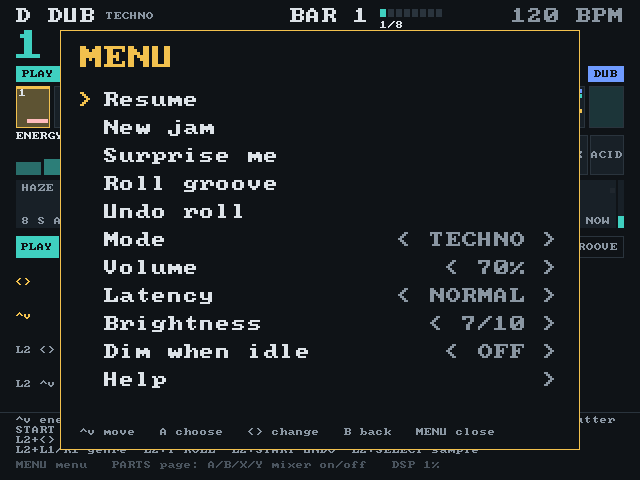
Buttons inside the menu
| Buttons | What it does |
|---|---|
| UP / DOWN | Move between rows. Wraps. |
| LEFT / RIGHT | Change a value. Hold: repeats after 0.4 s, then every 0.07 s. |
| A | Choose. On a value row it steps the value +1. On Help, Device and Samples it opens that screen. |
| B | Back. From the top level it closes the menu. |
| MENU | Close. |
Rows that ask first show “A = yes, B = no”: New jam, Surprise me, Power off, Quit.
Rows
| Row | What it does | TECHNO | CHORD | Miyoo | PC | Web |
|---|---|---|---|---|---|---|
| Resume | Closes the menu. | yes | yes | yes | yes | yes |
| New jam | Asks first. Every control goes back to the current genre’s (or mode’s) defaults. Source goes back to LIVE. Plays. Lands on the next bar line. Volume and ROLL history stay. In CHORD it also lets go of chords and clears the loop. | yes | yes | yes | yes | yes |
| Surprise me | Asks first. A fresh, safe random set. Next bar. | yes | no | yes | yes | yes |
| Roll groove | ROLL on the next bar line. Closes the menu. | yes | no | yes | yes | yes |
| Undo roll | UNDO on the next bar line. Closes the menu. | yes | no | yes | yes | yes |
| Mode | TECHNO or CHORD. LEFT / RIGHT switch. | yes | yes | yes | yes | yes |
| Volume | 5 % steps. | yes | yes | yes | yes | yes |
| Latency | SAFE / NORMAL / LOW. | yes | yes | yes | no | no |
| Brightness | 1 to 10. Shows ”—” until you touch it. | yes | yes | yes | no | no |
| Dim when idle | OFF / 30 s / 2 min. | yes | yes | yes | no | no |
| Samples | Only if WAV files loaded at start. A list: LIVE and each file. A picks. A star marks the current one. | if any | if any | if any | if any | never |
| Help | Help for the page you were on. | yes | yes | yes | yes | yes |
| Device | The Device screen. | yes | yes | yes | no | no |
| Power off | Asks first. Fades out and powers the console off. | yes | yes | yes | no | no |
| Quit | Asks first. Fades out and closes the program. | no | no | no | yes | no |
Row counts: Miyoo TECHNO 13 (14 with samples), Miyoo CHORD 10 (11). PC TECHNO 9 (10), PC CHORD 6 (7). Web TECHNO 8, Web CHORD 5.
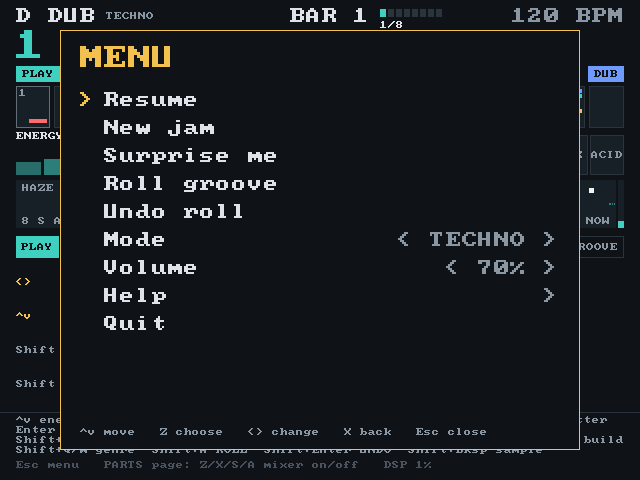
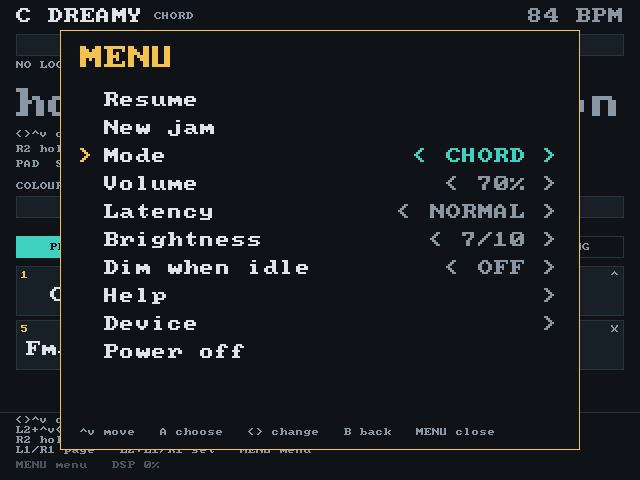
Short messages (a yellow box at the top for 2.5 s): NEW JAM: NEXT BAR, SURPRISE: NEXT BAR, NEW JAM, SURPRISE, ROLL: NEXT BAR, UNDO: NEXT BAR, NOTHING TO UNDO.
What some rows do in detail
| Row | Details |
|---|---|
| Mode | The sound fades out (about half a second), the mode changes in silence (about 0.12 s), then fades in. The screen shows ”…”. Held buttons are let go. Each mode remembers its own settings during the session. A mode you have not visited starts from defaults. The mode is saved for the next power-on. |
| Surprise me | Key: any of 12. Set: any of 8. Chord style: any of 11 safe ones (never OFF). PROG: any. Tempo: 112 to 128. Haze character and chord sound: any. Chord restarts at 1. In 3 of 8 draws it also picks another genre (then only the key is drawn and the genre sets the rest). In genres other than DUB it keeps that genre’s own style and tempo within 4 BPM. When it keeps the genre, it leaves levels, sends, filters, volume, swing and the sound source alone. When it picks a new genre, that genre’s own swing, levels, filters and sends come with it, as with any genre switch. Volume and ENERGY always stay. |
| Latency | SAFE = 60 ms buffer. NORMAL = 25 ms. LOW = 12 ms (less delay, more risk of crackle). Applies after a restart (the menu says so in red). |
| Brightness | 1 to 10. Default is whatever the console had (boot.sh reads the stock level, falls back to 7). |
| Dim when idle | After 30 s or 2 min with no button, the backlight dims. The first press only wakes it and is not passed to the music. A held button does not count as idle. |
Help screen
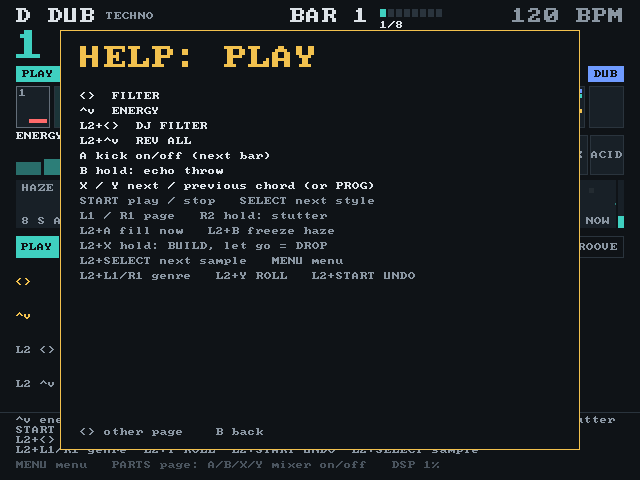
Shows “HELP:
Device screen (Miyoo only)
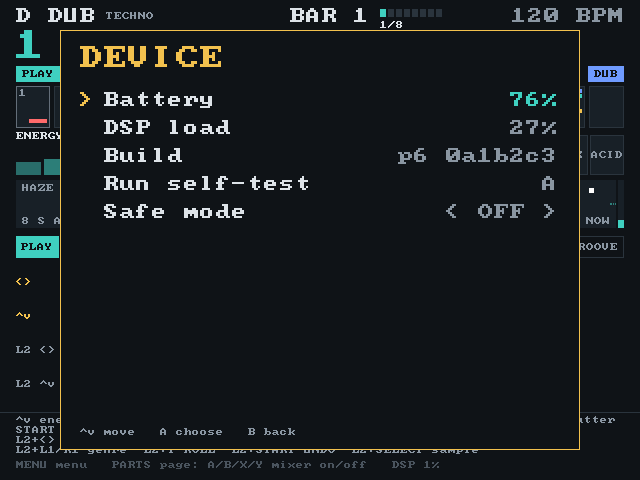
| Row | What it shows or does |
|---|---|
| Battery | Percent, or ”?” if unknown. |
| DSP load | How busy the sound engine keeps the processor, in percent. |
| Build | Version text, for example “p6 0a1b2c3”. The label “p6” is what the code still carries. |
| Run self-test | A: closes the menu, runs the full self-test, then returns to the jam. |
| Safe mode | ON / OFF. LEFT / RIGHT or A. Applies after a restart. |
Safe mode ON from here does what the boot does: your audio.cfg is moved to audio.cfg.mine and a calm one is written. OFF puts yours back.
11. settings.cfg and audio.cfg
settings.cfg
Where: Miyoo /mnt/SDCARD/grainos/settings.cfg. PC: the folder you start from (or the folder in $GRAIN_DATA_DIR). Web: nothing is saved. A reload gives defaults.
It is a text file with one key=value per line. The program writes it in the background and safely (it writes a temporary file, then renames it), so the card is never left half-written.
| Key | Meaning | Values | If absent |
|---|---|---|---|
| volume | Master volume. Saved about 1 s after it stops moving. | 0-100 | 70 |
| latency | Audio buffer. | 0 SAFE, 1 NORMAL, 2 LOW | 1 |
| brightness | Backlight. Written only after you touch it. | 1-10 | not written |
| dim | Dim when idle. | 0 OFF, 1 30 s, 2 2 min | 0 |
| mode | Mode at power-on. | 0 TECHNO, 1 CHORD | 0 |
A damaged file is ignored and defaults are used. Unknown keys are ignored.
Not saved: every jam setting (key, set, genre, tempo, ENERGY, page, mutes, sends, loops, chosen sample). Each power-on starts the default jam again. There are no saved jams.
audio.cfg
Lines are optional. A leading # switches a line off.
| Line | Meaning | Default |
|---|---|---|
| block | Audio is made in blocks of this many frames (64 to 2048). Bigger is safer, with more delay. | 256 (from the card’s audio.cfg comment) |
| target_ms | Buffer length in ms. | 25 |
| stereo | 1 stereo, 0 mono. | 1 |
| frames | Frames per period. | 6 |
| rt | Real-time priority. | 1 |
| mlock | Lock memory. | 1 |
The Latency menu row writes target_ms and frames: NORMAL removes them, SAFE writes target_ms=60 frames=16, LOW writes target_ms=12 frames=4. Other lines are left alone.
Safe mode
| Automatic | The boot script puts a .booting marker. The app removes it when its first screen is drawn. If it is still there at the next boot, that boot got stuck. After two stuck boots in a row, safe mode turns on. |
| What it sets | stereo=0 rt=0 mlock=0 target_ms=60 frames=16. That means mono on purpose, no real-time priority, no memory lock, a big buffer. Your file is kept as audio.cfg.mine. A note file audio.cfg.safe-note.txt marks it. |
| Manual | Menu > Device > Safe mode, then restart. |
| Leave it | Menu > Device > Safe mode OFF, then restart. On a PC: delete audio.cfg and audio.cfg.safe-note.txt, rename audio.cfg.mine to audio.cfg, delete the hidden file .unclean. |
| Crash guard | If the app exits with an error, boot.sh restarts it, up to 3 tries (self-test is not repeated). Then it powers off. Check grainos.log. |
12. Files on the card
Layout after you copy a build to a card (FAT32, label GRAINOS):
| Path | What it is |
|---|---|
.tmp_update/runtime.sh | Hidden. The console runs it at start. It runs grainos/boot.sh. |
README.txt | Short text for the card. |
grainos/bin/grainos | The program. |
grainos/boot.sh | Stops the stock programs, turns on screen and backlight, sets the CPU to performance, turns Wi-Fi off, starts the app. |
grainos/poweroff.sh | Syncs and unmounts the card, then powers off. |
grainos/audio.cfg | Audio settings (see above). |
grainos/samples/ | Your WAV files (see below). |
grainos/DEVICE-TEST.md | Device test notes. |
grainos/BUILD.txt | Names the build on the card. |
Files that GrainOS creates:
| File | What it is |
|---|---|
grainos/settings.cfg | Your five menu settings. |
grainos/report-N.txt | Self-test report. N counts up. |
grainos/grainos.log | The log. Rolls over to grainos.log.old above 200 KB. |
grainos/first_boot_done | Marks that the first-boot self-test has run. Delete it to run the self-test at next start. |
grainos/.booting, grainos/.unclean | Hidden markers used for safe mode (stuck-boot detection). |
grainos/audio.cfg.mine, audio.cfg.safe-note.txt | Present only while safe mode is on. |
If you send logs to get help, send report-*.txt, grainos.log, BUILD.txt, and audio.cfg.safe-note.txt if it exists.
Samples (WAV files)
| Fact | Value |
|---|---|
| Where | grainos/samples/ on the card. PC: ./samples, the folder given on the command line, or $GRAIN_SAMPLES. |
| Format | 16-bit PCM WAV, mono or stereo, any sample rate. |
| Limits | 16 files, each at least 0.1 s. Only the first 60 s of each is kept. 40 MB of memory in total. |
| When read | At start only. |
| Names | Shown without “.wav”. |
| Use | In TECHNO, L2+SELECT cycles LIVE, sample 1, 2, … and back to LIVE. The haze then granulates the file instead of the live buffer. Menu > Samples also picks one. |
| Web | The web build loads no WAV files. |
Self-test
It runs by itself only on the first boot of a card. Run it again from Menu > Device > Run self-test. It takes 1 to 2 minutes on the device. It measures memory, screen cost, engine cost, and 30 s of audio (underruns, steadiness, stereo or mono, and how late button presses are noticed). The result is PASS, WARN or FAIL. WARN is normal on a first run. FAIL is a real problem, but you can still press A or START to start the jam. On a PC, make selftest runs a quick headless version (about 25 s).
Switching off
| Way | What happens |
|---|---|
| Hold MENU for 1 s | A yellow bar fills along the bottom. The sound fades over 0.4 s. “POWERING OFF…” shows. The console powers off in a few seconds. |
| Menu > Power off | Same path, after A = yes. |
| PC | Hold Esc 1 s, Menu > Quit, or close the window. |
| Frozen | Hold the console’s power button for about 10 s. |
Never pull the card while the console is on.
PC command line
make proto builds build/desktop/grainjam. make run plays. Options: grainjam [sample_dir], --selftest [--quick], --selftest-jam, --headless [s] (scripted buttons), --render out.wav [s]. Settings and logs go in the current folder (or $GRAIN_DATA_DIR).
13. Screen reading guide
TECHNO screen, top to bottom
| Part | What it shows |
|---|---|
| Row 1 | Key and set (for example “D DUB”), mode, “BAR n”, 8 phrase dots with “n/8” (“FILL” in red on a fill bar), tempo. |
| Row 2 | Big chord number and name. An outlined “NEXT |
| Row 3, left | PLAY, STOPPED or “STOP NEXT BAR”. THROW, FREEZE, STUTTER (with rate), “BUILD n” or “DROP NEXT BAR”, “STYLE xxx” and an outlined ”> next style”. |
| Row 3, right | ROLL badge (“ROLL n”, “ROLL n >” waiting, “ROLL n NO UNDO” flashing). Genre badge. |
| Step strip | 16 boxes, beats numbered 1 to 4. Up to 7 marks per step, bottom to top: kick, snare/clap, hats, percussion (open hat, shaker), rim, chords, bass. A filled mark plays this bar. An outlined mark will be ADDED at the next bar line. A dimmed mark with a white line will be REMOVED. A dim chord mark is a quiet ghost stab. |
| ENERGY stairs | 7 steps. Lit steps are on. “ENERGY n” and ”> n” while waiting. |
| Part lights | 11 lights that flash on each hit. A yellow outline means waiting for the bar line. A yellow diagonal line means muted. |
| Haze strip | The last 8 seconds (“8 S AGO” to “NOW”) with grain dots and a yellow position line. “FROZEN” in blue. With a WAV: “SAMPLE n/N: name”. |
| Output meter | Right edge. Turns red above 95 %. |
| Bottom | Tab bar (13 tabs), the page’s four rows, a four-line footer, a grey status line with “DSP n%”. |
CHORD screen
Header: key, set and “CHORD” on the left, tempo on the right. Below: the loop row, the big chord name, the line “STYLE SOUND BEAT x INVERSION x”, the colour chips, the tabs, the 2 by 4 chord grid (or the page’s four rows), four footer lines, and the status line “MENU menu DSP n%”. The held chord’s cell lights teal and shows the coloured name. A looped chord is purple.
14. Glossary
| Word | Meaning |
|---|---|
| ACID | A genre with a squelchy 303-style bass line, straight 16ths and snare-roll builds. |
| ADD9 | A colour that adds the 9th note to a chord. |
| Arp (arpeggio) | The notes of a chord played one after another instead of together. |
| Attack | How fast a sound fades in. |
| Bar | Four beats. 16 steps. |
| Bar line | The start of a bar. Many changes wait for it so the music stays in time. |
| Bar page | A page with four bars you edit with the d-pad. |
| Beat (CHORD mode) | The optional drum pattern in CHORD mode: OFF, BRUSH or LO-FI. |
| BPM | Beats per minute. The tempo. |
| BUILD | Hold L2+X to build tension over up to 8 bars. Let go to DROP. |
| Chord set | A group of 8 chords, in the key, mapped to the 8 chord buttons. |
| CHANGE ON | Whether a picked chord starts on the next beat or the next bar. |
| Colour | A change to a held chord: SWAP, 7TH, SUS or ADD9. |
| Decay | How long a sound takes to die away. |
| DJ filter | A sweep on the whole mix. Left of centre removes highs, right removes lows. |
| DROP | The moment after a build when everything comes back. |
| Duck | The kick pushes the chords and pad down for a moment, so the groove pumps. Also called sidechain. |
| Echo | A delay. Repeats of the sound. |
| Echo send | How much of one part goes into the echo. |
| ENERGY | A 0 to 7 dial for how busy the groove is. |
| Feel | The groove’s timing style: NORMAL, HALF-TIME, DOUBLE HATS, SHUFFLE. |
| Fill | A drum variation, usually in the last bar of a phrase. |
| Flavour | Genre in TECHNO, chord set in CHORD. Changed with L2+L1 / L2+R1. |
| Freeze | Latch the haze: it stops recording and keeps granulating the last 8 seconds. |
| Genre | A bundle of sounds, tempo and groove: DUB, DEEP HOUSE, LO-FI, ACID. |
| Ghost note | A very quiet hit. |
| Grain | A tiny slice of sound, a few milliseconds to a second long. |
| Haze | A cloud made of tiny grains cut from the last 8 seconds of the chords and pad, or from a WAV, and replayed. |
| HELD | A bass or chord that rings for the whole bar. |
| Hold (PROG) | The chord stays until you pick another. |
| Human | A little lateness added to hits so they feel less machine-like. |
| Inversion | The same chord with different notes at the bottom: ROOT, 1ST, 2ND, OPEN. |
| Key | The home note of the music. 12 choices. |
| Latch | A switch that stays on after you press once. FREEZE is a latch. LATCH ON BEAT snaps presses to the beat. |
| Latency | The delay between a button press and sound. Also the audio buffer size. |
| Loop | In CHORD mode, bars of chords you recorded with R2. Up to 8 bars. |
| Mute | A part switched off by hand. It wins over ENERGY. |
| Overdub | Replace bars of a playing loop by holding R2 again. |
| Override | The badge shown when you pick a chord by hand while a PROG runs. |
| Pad | A slow, soft background chord. |
| Page | One screen of controls. TECHNO has 13, CHORD has 6. |
| Part | One instrument, such as kick or hats. |
| Phrase | 8 bars. Genre changes and PROG walks line up to it. |
| Phrase line | The start of the next 8-bar phrase. |
| PROG | A ready-made 8-bar chord walk. Four per set. |
| Punch | The click and pitch sweep at the start of the kick. |
| Quantise | Snap to the grid. The looper snaps to 8ths. |
| Release | How long a sound rings after you let go. |
| Resonance | A whistle at the filter cutoff. More is more squelchy. |
| Reverb send | How much of one part goes into the reverb (the room). |
| ROLL | A new small variation of the groove inside the genre. UNDO goes back. |
| Safe mode | A calm audio setup (mono, big buffer) for when the console had trouble starting. |
| Self-test | A check the device runs on first boot. |
| Set | See chord set. |
| Sidechain | See duck. |
| Step | One 16th note. 16 steps in a bar. |
| Strum | Chord notes played one after another, quickly. |
| Stutter | A beat-repeat. Hold R2 and a slice of the mix repeats. |
| Sub | A low sine bass under the chord root. |
| Sus (sus2, sus4) | A chord where the third is replaced by the 2nd or the 4th. It sounds open. |
| Swing | Delay of every second 16th note, for a loose feel. |
| Throw (echo throw) | Hold B and the chords go fully into the echo. |
| Triplet | Three notes in the time of two. |
| Voice leading | When the chord changes, each note slides to the nearest note of the new chord instead of jumping. |
| WAV | A plain sound file. Put them in grainos/samples/. |